
Overview
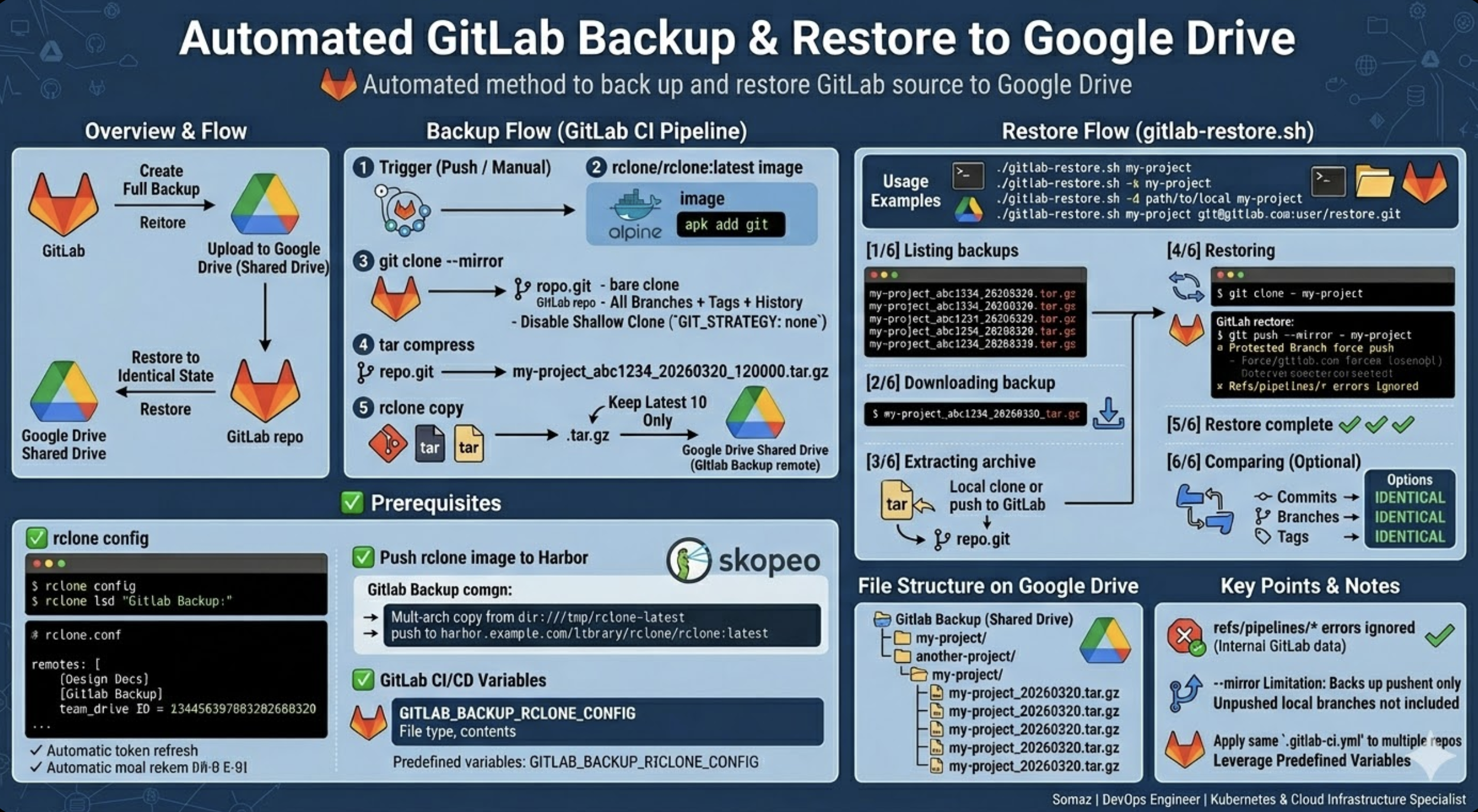
GitLab 소스를 Google Drive 공유 드라이브에 자동 백업하고, 필요 시 리스토어하는 방법을 정리한다.
`git clone --mirror` 를 사용하여 모든 브랜치, 태그, 커밋 히스토리를 포함한 완전한 백업을 생성하고, `rclone` 을 통해 Google Drive에 업로드한다. 리스토어 시에는 `git push --mirror` 로 원본과 동일한 상태를 복원할 수 있다.
[Backup Flow]
GitLab CI Pipeline (push / manual trigger)
  → git clone --mirror (all branches + tags + history)
  → tar compress
  → rclone copy → Google Drive (Shared Drive)

[Restore Flow]
Google Drive (Shared Drive)
  → rclone copy → local
  → tar extract
  → git push --mirror → GitLab repo
Prerequisites
1. rclone config
rclone config
# n (New remote)
# Name: Gitlab Backup
# Storage: drive (Google Drive)
# scope: drive (Full access)
# Configure this as a Shared Drive? → y → Select shared drive
설정 완료 후 확인
rclone config show
rclone lsd "Gitlab Backup:"
rclone config 파일 1개에 remote를 여러 개 등록할 수 있다. remote 1개에 공유 드라이브(team drive) 1개가 연결되며, 같은 Google 계정이면 token을 공유할 수 있다.
# rclone.conf example

[Design Docs]
type = drive
team_drive = aaaa1111bbbb
scope = drive
token = {"access_token":"...","refresh_token":"..."}

[Gitlab Backup]
type = drive
team_drive = cccc2222dddd
scope = drive
token = {"access_token":"...","refresh_token":"..."}
token의 `expires_in: 3599` (약 1시간)은 access_token 유효시간이다. rclone이 refresh_token으로 자동 갱신하므로 신경 쓸 필요 없다.
2. Push rclone image to Harbor
# Copy multi-arch image to local
skopeo copy --all docker://rclone/rclone:latest dir:///tmp/rclone-latest

# Push to Harbor
skopeo copy --all --dest-tls-verify=false \
  dir:///tmp/rclone-latest docker://harbor.example.com/library/rclone/rclone:latest
3. GitLab CI/CD Variables
| Variable | Type | Description |
| GITLAB_BACKUP_RCLONE_CONFIG | File | rclone config file |
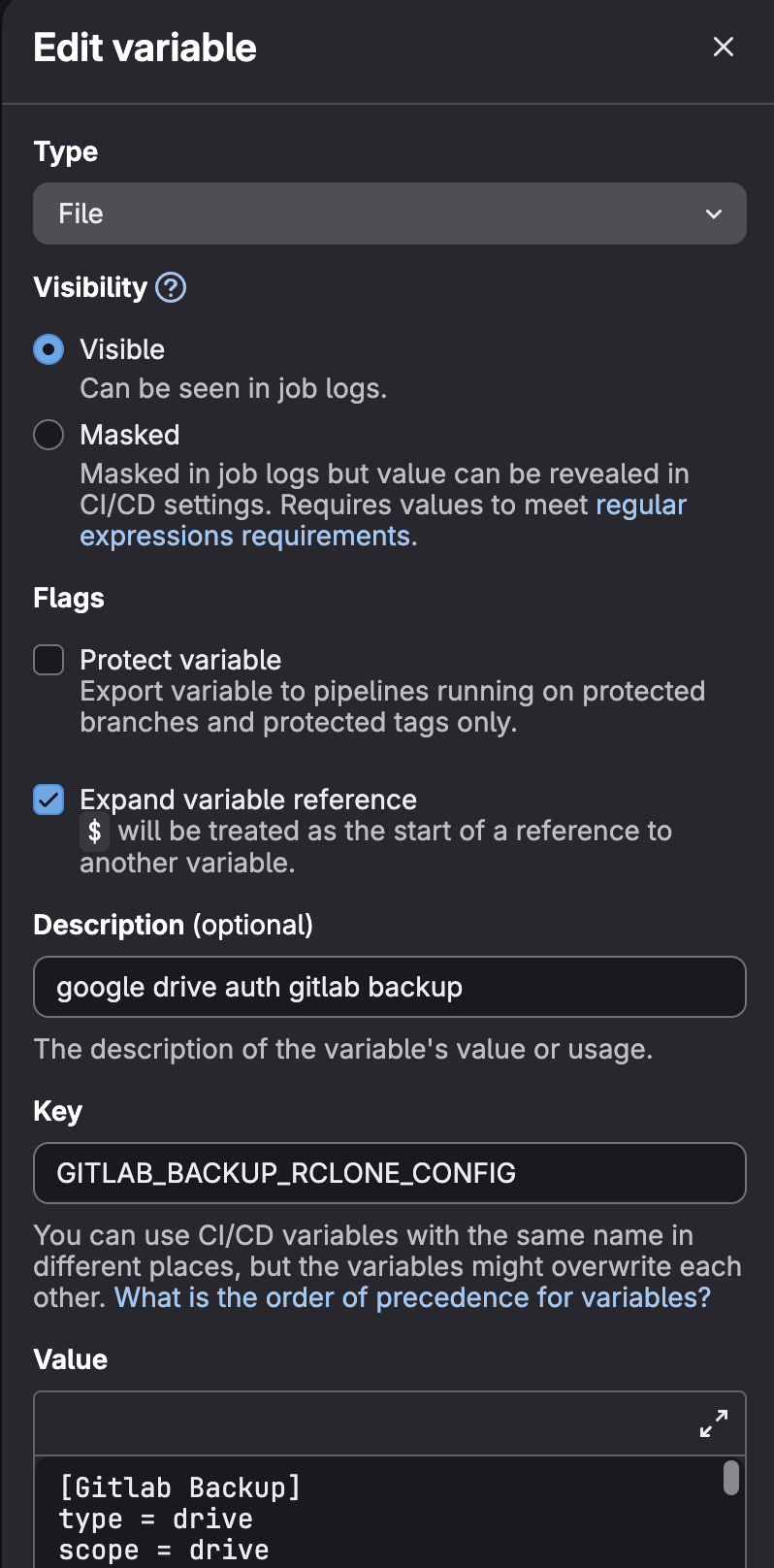
rclone config file content
[Gitlab Backup]
type = drive
scope = drive
team_drive = <SHARED_DRIVE_ID>
token = {"access_token":"...","refresh_token":"...","expiry":"..."}- 나머지 변수(`CI_JOB_TOKEN, CI_SERVER_HOST, CI_PROJECT_PATH, CI_PROJECT_NAME, CI_COMMIT_SHORT_SHA, CI_PIPELINE_SOURCE`)는 GitLab predefined 변수로 자동 제공된다.
- https://docs.gitlab.com/ci/variables/predefined_variables/
Backup (.gitlab-ci.yml)
stages:
  - source-backup

variables:
  CONFIG: $GITLAB_BACKUP_RCLONE_CONFIG

source-backup:
  stage: source-backup
  image: rclone/rclone:latest
  interruptible: true
  retry:
    max: 1
    when:
      - runner_system_failure
      - unknown_failure
      - data_integrity_failure
    exit_codes:
      - 137
  variables:
    GIT_STRATEGY: none
  before_script:
    - apk add --no-cache git
  script:
    - git clone --mirror http://gitlab-ci-token:${CI_JOB_TOKEN}@${CI_SERVER_HOST}/${CI_PROJECT_PATH}.git repo.git
    - tar czf /tmp/${CI_PROJECT_NAME}_${CI_COMMIT_SHORT_SHA}_$(date +%Y%m%d_%H%M%S).tar.gz repo.git
    - rclone copy /tmp/*.tar.gz "Gitlab Backup:${CI_PROJECT_NAME}/" --progress --config $CONFIG
    # Clean up old backups (keep latest 10)
    - rclone lsf "Gitlab Backup:${CI_PROJECT_NAME}/" --config $CONFIG | sort | head -n -10 | while read f; do
        rclone deletefile "Gitlab Backup:${CI_PROJECT_NAME}/$f" --config $CONFIG;
      done
  tags:
    - build-image
  rules:
    - if: '$CI_PIPELINE_SOURCE == "web"'
    - if: '$CI_PIPELINE_SOURCE == "push"'
Key Points
- `GIT_STRATEGY: none` — CI 기본 clone(shallow)을 비활성화한다. CI 기본 clone은 `--depth 1` 로 현재 브랜치의 최신 커밋만 가져오기 때문에 전체 백업에 적합하지 않다.
- `git clone --mirror` — 모든 브랜치 + 태그 + 전체 커밋 히스토리를 클론한다. push 안 된 로컬 브랜치는 포함되지 않는다.
- 최근 10개 백업만 유지하고 나머지는 자동 삭제한다.
- 백업할 리포마다 동일한 `.gitlab-ci.yml` 을 넣으면 `${CI_PROJECT_NAME}` 등 변수가 자동으로 해당 리포에 맞게 적용된다.
- `rclone/rclone:latest` 이미지는 Alpine 기반으로 git이 포함되어 있지 않아 `before_script` 에서 `apk add --no-cache git` 으로 설치한다.
Backup file structure on Google Drive
Gitlab Backup (Shared Drive)
├── my-project/
│   ├── my-project_abc1234_20260320_120000.tar.gz
│   ├── my-project_def5678_20260321_150000.tar.gz
│   └── my-project_efc199d_20260323_072951.tar.gz
├── another-project/
│   └── another-project_ghi9012_20260323_080000.tar.gz
└── ...
Restore (gitlab-restore.sh)
리스토어 스크립트는 Google Drive에서 백업을 다운로드하고 압축 해제 후 로컬 또는 GitLab 리포로 복원한다. 원본 리포와의 비교 기능도 포함되어 있다.
Script
Usage
Restore latest backup to local
./gitlab-restore.sh my-projectRestore latest backup to GitLab repo
./gitlab-restore.sh my-project git@gitlab.example.com:group/restore-repo.gitGitLab에 빈 리포를 먼저 생성해야 한다. Protected Branch가 설정되어 있으면 Settings → Repository → Protected Branches에서 force push를 허용해야 한다.
Select specific backup
./gitlab-restore.sh -s my-project[1/6] Listing backups
---
1) my-project_abc1234_20260320_120000.tar.gz
2) my-project_def5678_20260321_150000.tar.gz
3) my-project_efc199d_20260323_072951.tar.gz
---
Select backup number to restore (1-3):Restore and compare with original repo
./gitlab-restore.sh -d ~/gitlab-project/my-project my-project[6/6] Comparing with: ~/gitlab-project/my-project
---
Commits: IDENTICAL
Branches: IDENTICAL
Tags: IDENTICAL
---Combined options
# Select + compare
./gitlab-restore.sh -s -d ~/gitlab-project/my-project my-project

# Select + restore to GitLab + compare
./gitlab-restore.sh -s -d ~/gitlab-project/my-project my-project git@gitlab.example.com:group/restore-repo.git

# Custom remote + config + work directory
./gitlab-restore.sh -r "Gitlab Backup" -c ~/.config/rclone/rclone.conf -w /tmp/restore my-project
Options
| Option | Description | Default |
| -s, --select | Select backup from list | Latest backup |
| -d, --diff <path> | Compare with local repo after restore | Disabled |
| -r, --remote <name> | rclone remote name | Gitlab Backup |
| -w, --work-dir <path> | Working directory | /tmp/gitlab-restore |
| -c, --config <path> | rclone config file path | rclone default |
| -h, --help | Show help | - |
환경변수로도 설정 가능하다.
REMOTE="Gitlab Backup" WORK_DIR=/tmp/restore ./gitlab-restore.sh my-project
Execution Flow
[1/6] Listing backups        ← Fetch backup list from Google Drive
[2/6] Downloading backup     ← Download selected backup file
[3/6] Extracting archive     ← Extract tar.gz + display branches/tags
[4/6] Restoring              ← Local clone or git push --mirror to GitLab
[5/6] Restore complete
[6/6] Comparing              ← (Optional) Compare with original repo
Notes
- `refs/pipelines/*` 관련 에러는 GitLab 내부 파이프라인 메타데이터로 push가 거부되는 것이 정상이며 소스 복원에 영향 없다. 스크립트에서 자동으로 감지하고 무시한다.
- `--mirror` 는 서버에 push 된 내용만 백업한다. push 안 된 로컬 브랜치는 포함되지 않으므로 비교 시 차이가 날 수 있다.
- bare repo(`repo.git`)는 소스 파일이 직접 보이지 않는다. 로컬에서 작업하려면 `git clone repo.git` 으로 워킹 디렉토리를 생성해야 한다.
마무리
이 구성으로 GitLab 소스의 자동 백업과 리스토어가 가능해진다. 백업은 CI 파이프라인에서 push마다 자동으로 실행되고, 리스토어는 스크립트 하나로 Google Drive에서 다운로드 → 복원 → 검증까지 처리할 수 있다.
백업할 리포가 여러 개라면 각 리포에 동일한 `.gitlab-ci.yml` 을 넣으면 된다. `${CI_PROJECT_NAME}` 등 predefined 변수가 자동으로 리포별 경로를 생성하기 때문에 별도 수정 없이 동작한다.
rclone의 Google Drive 연동은 한번 설정하면 token이 자동 갱신되므로 유지보수가 거의 필요 없다. 공유 드라이브를 사용하면 팀 단위로 백업을 관리할 수 있고, 필요 시 `rclone remote` 를 추가하여 다른 공유 드라이브로 확장할 수 있다.
Reference
- rclone Google Drive Configuration
- rclone Shared Drive (Team Drive)
- git clone --mirror Documentation
- git push --mirror Documentation
- GitLab CI/CD Predefined Variables
- GitLab Protected Branches
- skopeo - Container Image Tool
Somaz | DevOps Engineer | Kubernetes & Cloud Infrastructure Specialist
'IaC > CI CD Tool' 카테고리의 다른 글
| GitLab CI/CD YAML 파일 최적화: 중복 제거와 재사용성 향상 (0) | 2026.03.17 |
|---|---|
| GitLab CI로 Google Drive에 자동 업로드하기 (0) | 2025.11.12 |
| GitLab 18.0 업그레이드 시 git_data_dirs 설정 변경 가이드 (2) | 2025.11.05 |
| Git 레포지토리 GitLab 마이그레이션 가이드 (2) | 2025.08.05 |
| 대형 Git 리포지터리에서 CI/CD 시간을 절반으로 줄이는 법: Git Sparse Checkout 실전 적용기 (4) | 2025.06.09 |