
Overview
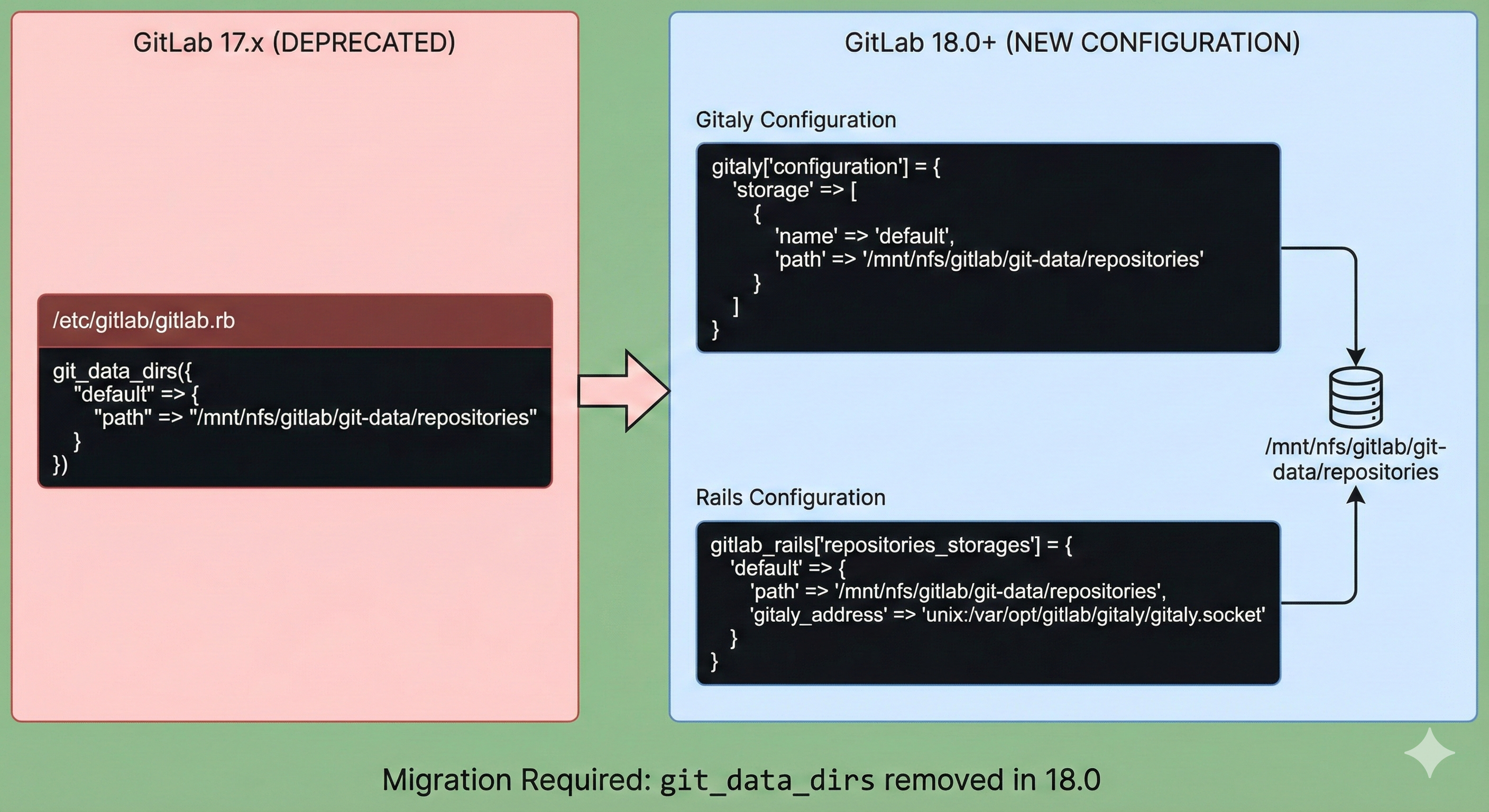
GitLab 18.0부터는 기존의 `git_data_dirs` 설정이 완전히 제거되었다. 이로 인해 GitLab 17.x 버전에서 18.0 이상으로 업그레이드할 때 설정 파일을 수정하지 않으면 업그레이드가 실패하게 된다.
이 글에서는 GitLab 17.11.5에서 18.1로 업그레이드하면서 발생한 `git_data_dirs` 관련 오류를 해결하는 방법을 다루겠다.
문제 상황
GitLab 18.1 업그레이드 과정에서 다음과 같은 오류가 발생했다.
* git_data_dirs has been deprecated since 17.8 and was removed in 18.0.
  See https://docs.gitlab.com/omnibus/settings/configuration.html#migrating-from-git_data_dirs
  for migration instructions.
Deprecations found. Please correct them and try again.
dpkg: error processing archive /var/cache/apt/archives/gitlab-ce_18.1.1-ce.0_amd64.deb (--unpack):
new gitlab-ce package pre-installation script subprocess returned error exit status 1- 이 오류는 GitLab 17.8부터 deprecated된 `git_data_dirs` 설정이 GitLab 18.0에서 완전히 제거되었기 때문이다.
해결 방법
1. 기존 설정 확인
먼저 현재 GitLab 설정 파일(`/etc/gitlab/gitlab.rb`)에서 `git_data_dirs` 설정을 확인한다
# 기존 설정 (GitLab 18.0부터 사용 불가)
git_data_dirs({
  "default" => {
    "path" => "/mnt/nfs/gitlab/git-data/repositories"
  }
})- 필자는 nfs 저장소를 mount 해서 git-data 저장공간으로 사용중이다.
2. 새로운 설정으로 변경
GitLab 18.0부터는 Gitaly 설정과 Rails 설정을 분리하여 구성해야 한다.
Gitaly 설정
# GitLab 18.0+ 새로운 Gitaly 설정
gitaly['configuration'] = {
  'storage' => [
    {
      'name' => 'default',
      'path' => '/mnt/nfs/gitlab/git-data/repositories'
    }
  ]
}
Rails 설정
# Rails 리포지토리 스토리지 설정
gitlab_rails['repositories_storages'] = {
  'default' => {
    'path' => '/mnt/nfs/gitlab/git-data/repositories',
    'gitaly_address' => 'unix:/var/opt/gitlab/gitaly/gitaly.socket'
  }
}
3. 설정 적용 및 업그레이드
기존 `git_data_dirs` 설정 제거
sudo vi /etc/gitlab/gitlab.rb
# git_data_dirs 관련 설정을 모두 주석 처리하거나 삭제
새로운 설정 추가: 위에서 제시한 새로운 설정을 `/etc/gitlab/gitlab.rb` 파일에 추가한다.
# GitLab 18.0+ 새로운 Gitaly 설정
gitaly['configuration'] = {
  'storage' => [
    {
      'name' => 'default',
      'path' => '/mnt/nfs/gitlab/git-data/repositories'
    }
  ]
}
# Rails 리포지토리 스토리지 설정
gitlab_rails['repositories_storages'] = {
'default' => {
'path' => '/mnt/nfs/gitlab/git-data/repositories',
'gitaly_address' => 'unix:/var/opt/gitlab/gitaly/gitaly.socket'
}
}
업그레이드 재시도
- 업그레이드 버전 경로는 아래의 사이트에서 확인하시면 된다.
- https://gitlab-com.gitlab.io/support/toolbox/upgrade-path/
sudo apt update

# 업그레이드 할 버전 , 아래는 예시이다.
version=18.2.8-ce.0
apt-get install -y gitlab-ce=$version
GitLab 설정 적용
sudo gitlab-ctl reconfigure
주요 변경 사항
설정 구조의 변화
- 이전 (GitLab 17.x): `git_data_dirs` 로 통합 관리
- 이후 (GitLab 18.0+): Gitaly와 Rails 설정 분리
새로운 설정의 장점
- 명확한 역할 분리: Gitaly 서버와 Rails 애플리케이션의 설정이 명확히 구분된다.
- 향상된 확장성: 멀티 Gitaly 환경에서 더 유연한 설정이 가능하다.
- 미래 지향적: GitLab의 마이크로서비스 아키텍처에 더 적합하다.
추가 고려 사항
다중 스토리지 설정
여러 개의 Git 스토리지를 사용하는 경우
gitaly['configuration'] = {
  'storage' => [
    {
      'name' => 'default',
      'path' => '/mnt/nfs/gitlab/git-data/repositories'
    },
    {
      'name' => 'storage1',
      'path' => '/mnt/nfs/gitlab/git-data/repositories-1'
    }
  ]
}

gitlab_rails['repositories_storages'] = {
  'default' => {
    'path' => '/mnt/nfs/gitlab/git-data/repositories',
    'gitaly_address' => 'unix:/var/opt/gitlab/gitaly/gitaly.socket'
  },
  'storage1' => {
    'path' => '/mnt/nfs/gitlab/git-data/repositories-1',
    'gitaly_address' => 'unix:/var/opt/gitlab/gitaly/gitaly.socket'
  }
}
권한 확인
설정 변경 후 스토리지 경로의 권한을 확인한다
sudo chown -R git:git /mnt/nfs/gitlab/git-data/repositories
sudo chmod -R 755 /mnt/nfs/gitlab/git-data/repositories
마무리
GitLab 18.0으로의 업그레이드는 단순한 버전 업데이트가 아닌 아키텍처 변경을 포함하고 있다. `git_data_dirs` 의 제거는 GitLab이 더욱 모듈화된 구조로 발전하고 있음을 보여준다.
이번 변경으로 인해 초기 설정 과정에서 약간의 복잡함이 있을 수 있지만, 장기적으로는 더 안정적이고 확장 가능한 GitLab 환경을 구축할 수 있게 된다.
업그레이드 전에는 반드시 백업을 수행하고, 테스트 환경에서 먼저 검증한 후 프로덕션 환경에 적용하는 것을 권장한다. GitLab의 지속적인 발전과 함께 이러한 변경 사항들을 미리 파악하고 준비하는 것이 안정적인 운영의 핵심이다.
Reference
https://gitlab.com/gitlab-org/omnibus-gitlab/-/merge_requests/8273
'IaC > CI CD Tool' 카테고리의 다른 글
| GitLab CI로 Google Drive에 자동 업로드하기 (0) | 2025.11.12 |
|---|---|
| Git 레포지토리 GitLab 마이그레이션 가이드 (2) | 2025.08.05 |
| 대형 Git 리포지터리에서 CI/CD 시간을 절반으로 줄이는 법: Git Sparse Checkout 실전 적용기 (4) | 2025.06.09 |
| ArgoCD Slack Notification 설정 방법 (0) | 2025.05.08 |
| ArgoCD SSO 구성 가이드(Gitlab) (0) | 2025.03.31 |