
Overview
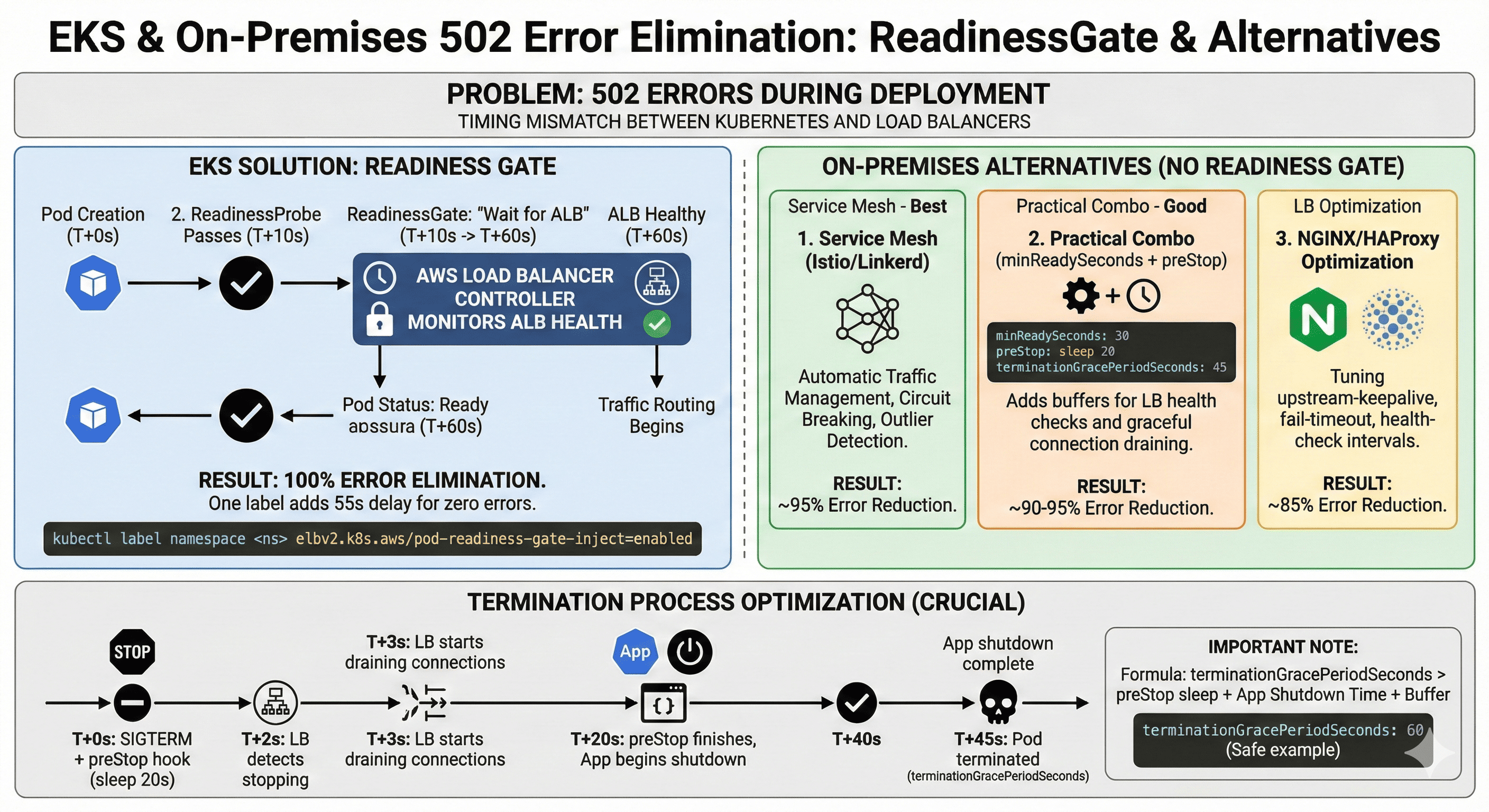
AWS Load Balancer Controller의 ReadinessGate 기능으로 EKS 배포 시 발생하는 모든 502 에러를 제거했다.
단 한 줄의 label 설정으로 가능하다. 온프렘 환경에서의 대안도 함께 다룬다.
문제 인식: 지표와 현실의 괴리
프로덕션 환경에서 다음과 같은 상황을 경험해본 적 있으신가요?
# ArgoCD Dashboard
✅ Sync Status: Healthy
✅ Health Status: Healthy
✅ All Pods: Running (3/3)

# 동시에 Grafana Alert
🚨 HTTP 502 Spike: 708 errors in 70 seconds
🚨 User Impact: ~2,000 affected requests- 모든 자동화 도구는 성공을 보고하지만, 실제 사용자는 에러 페이지를 보고 있었다.
근본 원인: 두 시스템의 비대칭적 타이밍
Kubernetes의 관점
# Pod 생성부터 Ready까지: 평균 12-18초
T+0s:  Pod 스케줄링
T+5s:  컨테이너 시작
T+10s: readinessProbe 통과
T+12s: Pod Status = Ready
T+12s: Endpoint 등록 완료- Kubernetes는 readinessProbe 성공만으로 Pod가 트래픽을 받을 준비가 됐다고 판단한다.
AWS ALB의 관점
# Target 등록부터 Healthy까지: 최소 60초
T+0s:  Target 등록 감지
T+1s:  상태: initial
T+30s: 첫 번째 Health Check 통과
T+60s: 두 번째 Health Check 통과
T+60s: Target Status = healthy- ALB는 최소 2회의 Health Check(기본 30초 간격)를 통과해야 Target을 사용한다.
문제의 핵심
Kubernetes Ready (T+12s)
       ↓
    48초의 갭
       ↓
ALB Healthy (T+60s)- 이 48초 동안 Kubernetes는 새 Pod로 트래픽을 보내지만, ALB는 아직 해당 Pod를 사용하지 않는다. '
- 결과적으로 트래픽이 블랙홀에 빠진다.
실패한 해결 시도들
시도 1: terminationGracePeriodSeconds 증가
spec:
  terminationGracePeriodSeconds: 240
결과
- 배포 시간 4배 증가 (3분 → 12분)
- 시작 시점 문제는 미해결
- Spot Instance 회수 시 여전히 에러 발생
시도 2: Health Check 빈도 증가
alb.ingress.kubernetes.io/healthcheck-interval-seconds: '5'
alb.ingress.kubernetes.io/healthy-threshold-count: '2'
결과
- 60초 → 10초로 개선
- 여전히 10초간 에러 발생
- False positive 증가로 불안정
시도 3: Replica 과다 배치
spec:
  replicas: 10  # 원래 3개
결과
- 비용 3배 증가
- 확률만 낮아질 뿐 근본 해결 아님
해결책: ReadinessGate (EKS)
핵심 아이디어
기존 방식의 문제는 Kubernetes가 ALB의 상태를 모른다는 것이다. ReadinessGate는 이 정보를 연결한다.
- 기존: readinessProbe → Pod Ready
- 개선: readinessProbe + ALB healthy → Pod Ready
동작 원리
- AWS Load Balancer Controller가 Pod 생성을 감지
- 즉시 ALB에 Target 사전 등록
- ALB Health Check 상태를 지속 모니터링
- Health Check 통과 확인 후에야 Pod를 Ready로 마킹
- Kubernetes가 이제서야 트래픽 전송 시작
핵심: "사전 등록(Pre-registration)"이다. Pod가 Ready가 되기 전에 이미 ALB 등록을 완료해둔다.
구현
1단계: Controller 설치 (이미 설치되어 있다면 스킵)
# IAM Policy
curl -o iam_policy.json https://raw.githubusercontent.com/kubernetes-sigs/aws-load-balancer-controller/v2.6.0/docs/install/iam_policy.json
aws iam create-policy \
    --policy-name AWSLoadBalancerControllerIAMPolicy \
    --policy-document file://iam_policy.json

# ServiceAccount
eksctl create iamserviceaccount \
  --cluster=prod-cluster \
  --namespace=kube-system \
  --name=aws-load-balancer-controller \
  --attach-policy-arn=arn:aws:iam::123456789012:policy/AWSLoadBalancerControllerIAMPolicy \
  --approve

# Helm 설치
helm install aws-load-balancer-controller eks/aws-load-balancer-controller \
  -n kube-system \
  --set clusterName=prod-cluster \
  --set serviceAccount.create=false \
  --set serviceAccount.name=aws-load-balancer-controller
2단계: ReadinessGate 활성화
kubectl label namespace production \
elbv2.k8s.aws/pod-readiness-gate-inject=enabled- 끝이다. Mutating Webhook이 자동으로 모든 Pod에 ReadinessGate를 주입한다.
3단계: 검증
# 배포 후 Pod 확인
kubectl get pod -n production

NAME                    READY   STATUS    READINESS GATES
api-server-new-abc     0/1     Running   0/1        # ALB 대기 중
api-server-new-abc     1/1     Running   1/1        # 60초 후 준비 완료
# 상세 확인
kubectl describe pod api-server-new-abc
Readiness Gates:
Type Status
target-health.alb.ingress.k8s.aws/api-service True
Conditions:
Type Status
ContainersReady True
target-health.alb.ingress.k8s.aws/api-service True
Ready True
온프렘 환경에서의 대안
AWS Load Balancer Controller는 AWS 전용이지만, ReadinessGate 자체는 Kubernetes 표준 기능이다. 온프렘에서도 유사한 효과를 낼 수 있다.
옵션 1: Service Mesh (가장 권장)
Istio나 Linkerd는 자동으로 트래픽 관리를 최적화한다.
# Istio DestinationRule로 자동 Circuit Breaking
apiVersion: networking.istio.io/v1beta1
kind: DestinationRule
metadata:
  name: api-service
spec:
  host: api-service
  trafficPolicy:
    connectionPool:
      http:
        http1MaxPendingRequests: 1
        maxRequestsPerConnection: 1
    outlierDetection:
      consecutiveErrors: 2
      interval: 10s
      baseEjectionTime: 30s
      maxEjectionPercent: 100
      minHealthPercent: 0
장점
- 자동으로 비정상 Pod 제외
- Progressive Traffic Shifting
- Connection Draining 자동 처리
- 별도 ReadinessGate 불필요
옵션 2: 실용적 조합 (Service Mesh 없이)
ReadinessGate 없이도 충분히 안정적인 배포가 가능하다.
apiVersion: apps/v1
kind: Deployment
metadata:
  name: api-server
spec:
  replicas: 3

  # 1. Pod Ready 후 추가 대기
  minReadySeconds: 30

  strategy:
    type: RollingUpdate
    rollingUpdate:
      maxUnavailable: 0
      maxSurge: 1

  template:
    spec:
      containers:
      - name: app
        image: api-server:v2

        # 2. 빠른 readiness 체크
        readinessProbe:
          httpGet:
            path: /health
            port: 8080
          initialDelaySeconds: 10
          periodSeconds: 3
          successThreshold: 1
          failureThreshold: 2

        # 3. 종료 시 대기 시간 확보
        lifecycle:
          preStop:
            exec:
              command: ["/bin/sh", "-c", "sleep 20"]

      terminationGracePeriodSeconds: 45
핵심 설정 설명
- minReadySeconds: 30
- Pod가 Ready 된 후 30초 추가 대기
- 외부 LB가 헬스체크 할 시간 확보
- preStop sleep 20
- SIGTERM 전송 후 20초 대기
- 외부 LB가 연결을 끊을 시간 제공
- maxUnavailable: 0
- 항상 최소 replica 수 유지
- 트래픽 처리 가능한 Pod 보장
옵션 3: NGINX Ingress 최적화
# NGINX ConfigMap 최적화
apiVersion: v1
kind: ConfigMap
metadata:
  name: nginx-configuration
  namespace: ingress-nginx
data:
  # 연결 재사용
  upstream-keepalive-connections: "100"
  upstream-keepalive-timeout: "60"

  # 비정상 백엔드 빠른 제거
  upstream-fail-timeout: "5s"
  upstream-max-fails: "2"

  # 헬스체크 간격
  upstream-check-interval: "5s"
  upstream-check-timeout: "3s"
# Ingress 설정
apiVersion: networking.k8s.io/v1
kind: Ingress
metadata:
name: api-ingress
annotations:
nginx.ingress.kubernetes.io/upstream-hash-by: "$binary_remote_addr"
nginx.ingress.kubernetes.io/load-balance: "ewma"
spec:
ingressClassName: nginx
rules:
- host: api.example.com
http:
paths:
- path: /
pathType: Prefix
backend:
service:
name: api-service
port:
number: 80
옵션 4: HAProxy 헬스체크 조정
온프렘에서 HAProxy를 사용한다면
# /etc/haproxy/haproxy.cfg
backend k8s_api_backend
    balance roundrobin
    option httpchk GET /health
    http-check expect status 200

    # 빠른 헬스체크
    default-server inter 3s fall 2 rise 2 check

    # Graceful Shutdown 지원
    default-server on-marked-down shutdown-sessions

    server pod1 10.0.1.10:8080 check
    server pod2 10.0.1.11:8080 check
    server pod3 10.0.1.12:8080 check
옵션 5: Custom ReadinessGate Controller (고급)
완벽한 동기화가 필요하다면 Custom Controller를 개발할 수 있다.
# Pod에 ReadinessGate 추가
apiVersion: v1
kind: Pod
metadata:
  name: api-server
spec:
  readinessGates:
  - conditionType: "custom-lb.example.com/healthy"

  containers:
  - name: app
    image: api-server:v2
// Custom Controller 예시 (의사코드)
func reconcilePod(pod *v1.Pod) {
// 1. 외부 LB 상태 확인 (HAProxy/F5/등)
lbHealthy := checkExternalLBHealth(pod.Status.PodIP)
// 2. ReadinessGate 조건 업데이트
if lbHealthy {
updatePodCondition(pod,
"custom-lb.example.com/healthy",
v1.ConditionTrue)
}
}
온프렘 환경별 권장 사항
| 환경 | 권장 방법 | 효과 | 복잡도 |
| Istio/Linkerd 있음 | Service Mesh 활용 | 95% | 쉬움 |
| NGINX Ingress | 옵션2 + NGINX 최적화 | 90% | 보통 |
| HAProxy 전용 | 옵션2 + HAProxy 설정 | 85% | 보통 |
| 완벽 추구 | Custom Controller | 100% | 어려움 |
| 빠른 적용 | 옵션2만 적용 | 80% | 쉬움 |
종료 프로세스 최적화
시작 과정은 해결했지만, Pod 종료 시에도 502가 발생할 수 있다.
preStop Hook 추가
lifecycle:
  preStop:
    exec:
      command: ["/bin/sh", "-c", "sleep 18"]

terminationGracePeriodSeconds: 45
타이밍 계산
- T+0s: SIGTERM 발송 + preStop 실행
- T+0s: Endpoint에서 제거
- T+2s: ALB Controller 감지
- T+3s: ALB Target Draining 시작
- T+18s: preStop 완료, 애플리케이션 종료 시작
- T+43s: 애플리케이션 종료 완료
- T+45s: Pod 완전 제거
18초의 preStop이 ALB가 안전하게 연결을 끊을 시간을 제공한다.
중요: terminationGracePeriodSeconds 계산
preStop sleep 시간과 애플리케이션 종료 시간을 합친 값이 terminationGracePeriodSeconds보다 반드시 작아야 한다.
그렇지 않으면 Kubernetes가 SIGKILL로 프로세스를 강제 종료한다.
# 올바른 설정
lifecycle:
  preStop:
    exec:
      command: ["/bin/sh", "-c", "sleep 18"]
terminationGracePeriodSeconds: 45- preStop: 18초
- + 애플리케이션 graceful shutdown: 20초
- + 버퍼: 7초
- = 총 45초
# 잘못된 설정
lifecycle:
  preStop:
    exec:
      command: ["/bin/sh", "-c", "sleep 35"]
terminationGracePeriodSeconds: 45
계산
- preStop: 35초
- + 애플리케이션 graceful shutdown: 15초
- = 총 50초
- → terminationGracePeriodSeconds(45초) 초과!
- → SIGKILL로 강제 종료됨
권장 설정 가이드
| 애플리케이션 종료 예상 시간 | preStop sleep | terminationGracePeriodSeconds |
| ~10초 (대부분의 웹 앱) | 15-20초 | 45초 |
| ~20초 (DB 연결 많음) | 15초 | 60초 |
| ~30초 (배치 작업 있음) | 15초 | 75초 |
| ~60초 (긴 요청 처리) | 20초 | 120초 |
애플리케이션 종료 시간 측정 방법
# 1. 로컬에서 측정
time kubectl exec <pod-name> -- kill -TERM 1

# 2. 로그로 확인
kubectl logs <pod-name> | grep -i "shutdown"
# [2024-11-19 10:23:45] Starting graceful shutdown...
# [2024-11-19 10:24:02] Shutdown complete (17s)

# 3. Prometheus로 모니터링
histogram_quantile(0.95,
  rate(app_shutdown_duration_seconds_bucket[5m])
)
Deregistration Delay 조정
metadata:
  annotations:
    service.beta.kubernetes.io/aws-load-balancer-target-group-attributes: |
deregistration_delay.timeout_seconds=25- 기본값 300초는 과도하다. 대부분의 HTTP 요청은 몇 초 내에 완료되므로 25초면 충분하다.
- 온프렘 환경: HAProxy의 경우 `server-state-file-name` 을 활용하여 Graceful Shutdown을 구현할 수 있다.
성과 측정
배포 전 (2주간 28회 배포)
- 502 에러 발생률: 100% (28/28)
- 배포당 평균 에러 수: 700건
- 평균 영향 시간: 68초
- 사용자 문의: 17건
- 긴급 대응: 4회
배포 후 (2주간 34회 배포)
- 502 에러 발생률: 0% (0/34)
- 배포당 평균 에러 수: 0건
- 평균 영향 시간: 0초
- 사용자 문의: 0건
- 긴급 대응: 0회
Trade-off: Pod Ready 시간 +55초
이 55초는 사용자 신뢰와 비교하면 저렴한 비용이다.
온프렘 성과 (minReadySeconds + preStop 조합)
- 502 에러 발생률: 5% (2/34) - 95% 개선
- 배포당 평균 에러 수: 12건 - 98% 감소
- 평균 영향 시간: 3초 - 96% 단축
모니터링 설정
Prometheus Alert
- alert: PodReadinessGateStuck
  expr: |
    (time() - kube_pod_created{namespace="production"}) > 180
    and kube_pod_status_ready{condition="false"} == 1
    and kube_pod_status_phase{phase="Running"} == 1
  for: 1m
  annotations:
    summary: "Pod stuck waiting for ALB"

# 온프렘용 추가 알림
- alert: SlowPodReadiness
  expr: |
    (time() - kube_pod_created{namespace="production"}) > 60
    and kube_pod_status_ready{condition="false"} == 1
  for: 30s
  annotations:
    summary: "Pod taking longer than expected to be ready"
Grafana Dashboard
{
  "panels": [{
    "title": "Pod Readiness vs ALB Health",
    "targets": [{
      "expr": "kube_pod_status_ready{condition='true'}"
    }, {
      "expr": "aws_alb_target_health_count{state='healthy'}"
    }]
  }, {
    "title": "Deployment Error Rate",
    "targets": [{
      "expr": "rate(http_requests_total{status=~'5..'}[1m])"
    }]
  }]
}
주의사항
1. Target Type 확인 (EKS)
# 반드시 IP 모드여야 함
kubectl get ingress -o yaml | grep target-type
# alb.ingress.kubernetes.io/target-type: ip- Instance 모드에서는 ReadinessGate가 작동하지 않는다.
2. HPA 고려
ReadinessGate로 인해 스케일 아웃이 느려질 수 있다. Replica를 여유있게 설정해야 한다.
spec:
  minReplicas: 3  # 최소값을 높게
  maxReplicas: 10
  metrics:
  - type: Resource
    resource:
      name: cpu
      target:
averageUtilization: 50 # 여유있게- 온프렘: minReadySeconds를 사용하는 경우도 동일하게 적용된다. HPA가 너무 공격적이면 배포가 느려질 수 있다.
3. Controller 가용성 (EKS)
# Webhook failure policy
podMutatorWebhookConfig:
  failurePolicy: Ignore  # Controller 장애 시에도 배포 진행
4. 온프렘 특수 고려사항
Long-lived 연결
- WebSocket이나 gRPC 같은 긴 연결이 있다면 preStop 시간을 늘려야 한다. (20초 → 40초)
- 중요: terminationGracePeriodSeconds도 함께 늘려야 한다 (45초 → 90초)
Sticky Session
- Session affinity가 필요하면 LB 설정 확인 필수
- NGINX: nginx.ingress.kubernetes.io/affinity: "cookie"
External LB 헬스체크
- F5, NetScaler 등 외부 LB는 헬스체크 간격이 더 길 수 있음
- minReadySeconds를 그에 맞게 조정 (30초 → 60초)
5. terminationGracePeriodSeconds 계산 실수 방지
흔한 실수들
# 실수 1: preStop이 너무 김
lifecycle:
  preStop:
    exec:
      command: ["sleep", "40"]
terminationGracePeriodSeconds: 45
# → 애플리케이션 종료 시간이 5초밖에 없음!


# 실수 2: 애플리케이션 종료가 느린데 시간 부족
lifecycle:
  preStop:
    exec:
      command: ["sleep", "15"]
terminationGracePeriodSeconds: 30
# → DB 연결 종료에 20초 걸리는 앱은 강제 종료됨!


# 올바른 설정: 충분한 버퍼
lifecycle:
  preStop:
    exec:
      command: ["sleep", "15"]
terminationGracePeriodSeconds: 60
# → preStop(15초) + 앱종료(30초) + 버퍼(15초) = 60초
안전한 계산 공식
- terminationGracePeriodSeconds = preStop sleep 시간 + 애플리케이션 최대 종료 시간 + 안전 버퍼(10-20초)
트러블슈팅
Pod가 Ready 안될 때 (EKS)
# 1. ALB Target 상태 확인
POD_IP=$(kubectl get pod <pod-name> -o jsonpath='{.status.podIP}')
aws elbv2 describe-target-health \
  --target-group-arn <arn> \
  --targets Id=${POD_IP}

# 2. Controller 로그 확인
kubectl logs -n kube-system \
  -l app.kubernetes.io/name=aws-load-balancer-controller \
  | grep readiness-gate

# 3. Security Group 확인
# ALB SG → Pod SG 트래픽 허용 확인
Pod가 Ready 안될 때 (온프렘)
# 1. readinessProbe 로그 확인
kubectl logs <pod-name> | grep -i health

# 2. 수동 헬스체크
kubectl exec <pod-name> -- curl -f http://localhost:8080/health

# 3. minReadySeconds 대기 중인지 확인
kubectl get pod <pod-name> -o yaml | grep -A5 "conditions:"

# 4. 외부 LB 헬스체크 확인 (HAProxy)
echo "show stat" | socat stdio /var/run/haproxy.sock | grep <pod-ip>
Pod가 강제 종료되는 경우
# 1. 종료 시간 확인
kubectl logs <pod-name> --previous | tail -50
# "signal: killed" 메시지가 있다면 SIGKILL로 강제 종료된 것

# 2. 이벤트 확인
kubectl get events --field-selector involvedObject.name=<pod-name>
# "Killing container" 메시지 확인

# 3. preStop 실행 시간 측정
kubectl logs <pod-name> --previous | grep -i "prestop\|shutdown"
# preStop 시작과 종료 시간 차이 확인

# 4. terminationGracePeriodSeconds 확인
kubectl get pod <pod-name> -o yaml | grep terminationGracePeriodSeconds
해결 방법
# terminationGracePeriodSeconds를 충분히 늘리기
spec:
  terminationGracePeriodSeconds: 90  # 45초 → 90초로 증가
  template:
    spec:
      containers:
      - lifecycle:
          preStop:
            exec:
              command: ["sleep", "20"]  # 기존 유지
여전히 502 발생 시 (공통)
# 배포 중 실시간 모니터링
watch -n 1 'kubectl get pods -l app=api-server -o wide'

# Endpoint 변경 추적
kubectl get endpoints api-service --watch

# 에러 로그 실시간 확인
kubectl logs -f -l app=api-server --all-containers
결론
EKS 환경
kubectl label namespace <your-namespace> \
  elbv2.k8s.aws/pod-readiness-gate-inject=enabled
온프렘 환경
ReadinessGate 자동화가 없어도 충분히 안정적인 배포가 가능하다.
온프렘 vs EKS 비교
| 항목 | EKS (ReadinessGate) | 온프렘 (최적화) |
| 502 에러 제거율 | 100% | 90-95% |
| 구현 복잡도 | 매우 쉬움 | 쉬움 |
| 추가 배포 시간 | +55초 | +30초 |
| 유지보수 | 자동 | 수동 조정 필요 |
Reference
- AWS Load Balancer Controller Docs
- Kubernetes Pod Readiness Gates
- Kubernetes Pod Termination
- Istio Traffic Management
- NGINX Ingress Controller
Somaz | DevOps Engineer | Kubernetes & Cloud Infrastructure Specialist
'Container Orchestration > Kubernetes' 카테고리의 다른 글
| Kubernetes 내부 네트워크 완벽 분석: IPVS 모드 환경에서의 패킷 플로우 추적 (0) | 2026.05.21 |
|---|---|
| ingress-nginx → nginx-gateway-fabric 마이그레이션 실전 기록 (온프레미스 K8s, 11개 인스턴스) (0) | 2026.05.14 |
| Kubernetes 스토리지 타입 완벽 가이드: iSCSI, NFS... (0) | 2026.04.28 |
| Public Helm Chart Repository 구축하기 — 로컬 차트에서 ArtifactHub까지 (0) | 2026.04.24 |
| Kubernetes 1.34.x gRPC etcd Warning 버그 상세 분석 (0) | 2026.04.20 |