
Overview
Redis 클러스터는 고가용성과 확장성을 제공하는 강력한 분산 캐시 솔루션이다. 하지만 Kubernetes 환경에서 운영하다 보면 네트워크 분할, 노드 재시작, 설정 문제 등으로 인해 클러스터 상태가 불안정해질 수 있다.
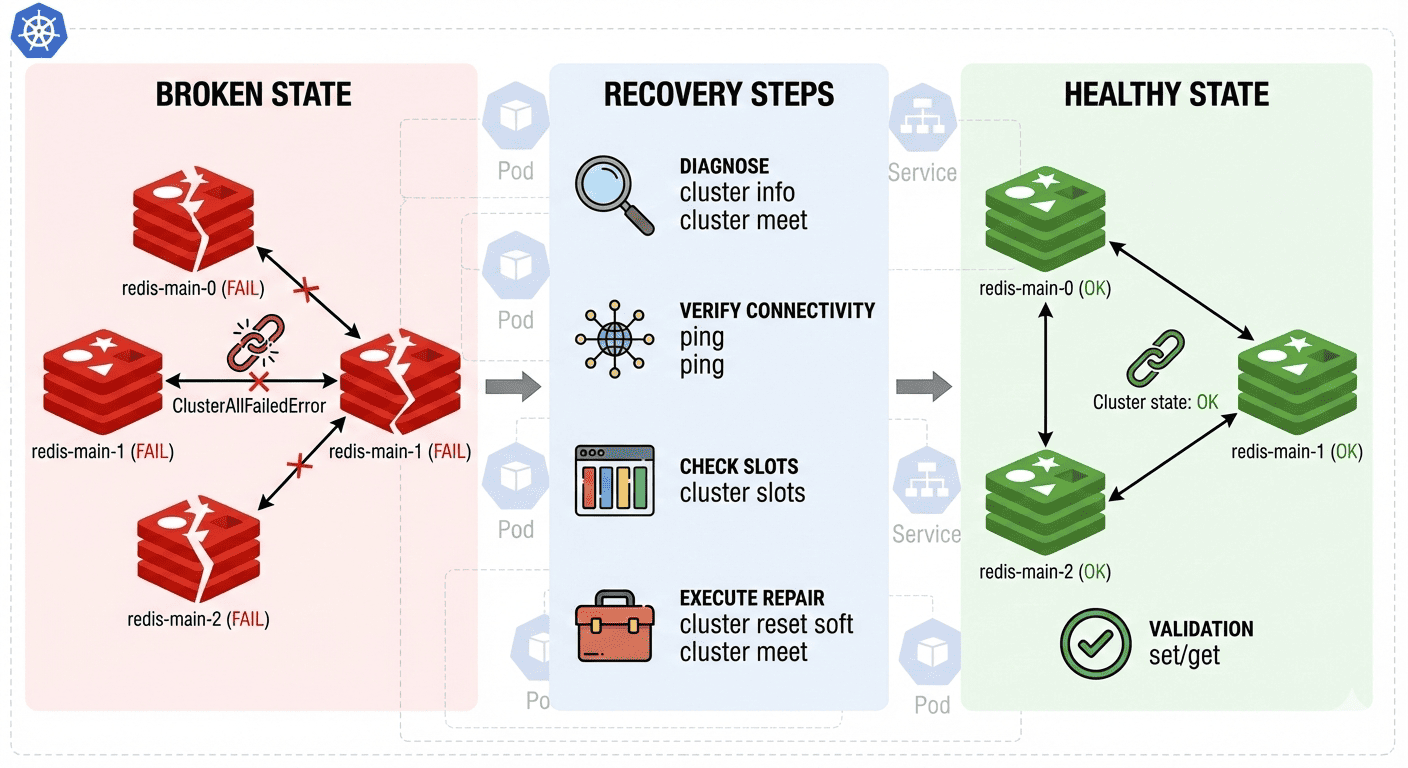
본 글에서는 Redis 클러스터에서 자주 발생하는 "ClusterAllFailedError"와 "Cluster state changed: fail" 문제를 진단하고 해결하는 실무적인 방법을 다룬다.
특히 `slots cache` 갱신 실패 문제부터 클러스터 완전 복구까지의 단계별 접근법을 상세히 알아보겠다.
📅 관련 글
2022.09.26 - [Open Source Software] - Redis(Remote Dictionary Server)란?
2025.04.02 - [CS 지식] - [CS 지식20.] OS 캐시와 디스크 I/O: MySQL, Redis 퍼포먼스 분석
장애 증상 분석
애플리케이션 레벨 에러
Redis 클라이언트(ioredis)에서 다음과 같은 에러가 발생한다.
[ioredis] Unhandled error event: ClusterAllFailedError: Failed to refresh slots cache.
    at tryNode (/app/node_modules/.pnpm/ioredis@5.7.0/node_modules/ioredis/built/cluster/index.js:323:31)
    at /app/node_modules/.pnpm/ioredis@5.7.0/node_modules/ioredis/built/cluster/index.js:340:21
    at Timeout.<anonymous> (/app/node_modules/.pnpm/ioredis@5.7.0/node_modules/ioredis/built/cluster/index.js:699:24)
이 에러는 다음을 의미한다.
- 클라이언트가 Redis 클러스터의 slots 정보를 갱신할 수 없음
- 모든 클러스터 노드에 대한 연결이 실패
- 클러스터 토폴로지 정보 동기화 문제
Redis 서버 레벨 증상
각 Redis 노드의 로그에서 확인되는 패턴
# 초기 시작 시
1:M 02 Sep 2025 05:58:10.944 * Cluster state changed: ok

# 몇 초 후 상태 변화
1:M 02 Sep 2025 05:58:26.645 # Cluster state changed: fail
정상 시작 후 실패로 전환되는 원인
- 클러스터 노드 간 네트워크 통신 문제
- 노드 검색 실패 (node discovery)
- slots 할당 불일치
- 클러스터 구성 정보 불일치
단계별 진단 및 해결
1단계: 클러스터 상태 진단
먼저 현재 클러스터 상태를 정확히 파악한다.
# 기본 클러스터 정보 확인
kubectl exec -it -n gameserver-cache redis-main-0 -- redis-cli cluster info

# 노드 구성 및 상태 확인
kubectl exec -it -n gameserver-cache redis-main-0 -- redis-cli cluster nodes

# 각 노드별 상태 확인
kubectl exec -it -n gameserver-cache redis-main-1 -- redis-cli cluster info
kubectl exec -it -n gameserver-cache redis-main-2 -- redis-cli cluster info
주요 확인 포인트:
- `cluster_state`: ok/fail 상태
- `cluster_slots_assigned`: 16384개 slots 할당 상태
- `cluster_known_nodes`: 인식된 노드 수
- `cluster_size`: 실제 클러스터 크기
2단계: 네트워크 연결성 검증
클러스터 노드 간 통신이 정상적인지 확인한다.
# 노드 간 ping 테스트
kubectl exec -it -n gameserver-cache redis-main-0 -- redis-cli ping
kubectl exec -it -n gameserver-cache redis-main-1 -- redis-cli ping
kubectl exec -it -n gameserver-cache redis-main-2 -- redis-cli ping

# 서비스 DNS 해상도 확인
kubectl exec -it -n gameserver-cache redis-main-0 -- nslookup redis-main-1.redis-main.gameserver-cache.svc.cluster.local
kubectl exec -it -n gameserver-cache redis-main-0 -- nslookup redis-main-2.redis-main.gameserver-cache.svc.cluster.local

# 클러스터 버스 포트 연결 테스트 (Redis 포트 + 10000)
kubectl exec -it -n gameserver-cache redis-main-0 -- nc -zv redis-main-1.redis-main.gameserver-cache.svc.cluster.local 16379
kubectl exec -it -n gameserver-cache redis-main-0 -- nc -zv redis-main-2.redis-main.gameserver-cache.svc.cluster.local 16379
3단계: Slots 할당 상태 점검
Redis 클러스터의 핵심인 해시 슬롯 분배 상태를 확인한다.
# 각 노드의 slots 할당 정보 확인
kubectl exec -it -n gameserver-cache redis-main-0 -- redis-cli cluster slots

# 할당되지 않은 slots 확인
kubectl exec -it -n gameserver-cache redis-main-0 -- redis-cli cluster check redis-main-0.redis-main.gameserver-cache.svc.cluster.local:6379
일반적인 slots 문제
- 중복 할당된 slots
- 할당되지 않은 slots
- 노드 간 slots 정보 불일치
4단계: 클러스터 복구 실행
진단 결과에 따라 적절한 복구 방법을 선택한다.
소프트 리셋을 통한 복구
클러스터 구성 정보만 리셋하고 데이터는 유지한다.
# 모든 노드에서 소프트 리셋 실행
kubectl exec -it -n gameserver-cache redis-main-0 -- redis-cli cluster reset soft
kubectl exec -it -n gameserver-cache redis-main-1 -- redis-cli cluster reset soft
kubectl exec -it -n gameserver-cache redis-main-2 -- redis-cli cluster reset soft
클러스터 재생성
# 클러스터 재구성 (replicas 없는 3-master 구성)
kubectl exec -it -n gameserver-cache redis-main-0 -- redis-cli --cluster create \
  redis-main-0.redis-main.gameserver-cache.svc.cluster.local:6379 \
  redis-main-1.redis-main.gameserver-cache.svc.cluster.local:6379 \
  redis-main-2.redis-main.gameserver-cache.svc.cluster.local:6379 \
  --cluster-replicas 0 --cluster-yes
성공 시 예상 출력은 아래와 같다.
[OK] All nodes agree about slots configuration.
>>> Check for open slots...
>>> Check slots coverage...
[OK] All 16384 slots covered.
5단계: 복구 검증
클러스터 복구 후 반드시 기능 검증을 수행한다.
# 클러스터 상태 재확인
kubectl exec -it -n gameserver-cache redis-main-0 -- redis-cli cluster info

# 데이터 읽기/쓰기 테스트
kubectl exec -it -n gameserver-cache redis-main-0 -- redis-cli set test-key "recovery-test"
kubectl exec -it -n gameserver-cache redis-main-0 -- redis-cli get test-key

# 다른 노드에서도 데이터 접근 확인
kubectl exec -it -n gameserver-cache redis-main-1 -- redis-cli get test-key
kubectl exec -it -n gameserver-cache redis-main-2 -- redis-cli get test-key

# 클러스터 키 분산 확인
kubectl exec -it -n gameserver-cache redis-main-0 -- redis-cli set key1 "value1"
kubectl exec -it -n gameserver-cache redis-main-0 -- redis-cli set key2 "value2"
kubectl exec -it -n gameserver-cache redis-main-0 -- redis-cli set key3 "value3"
고급 문제 해결
부분 노드 장애 시 복구
일부 노드만 문제가 있는 경우
# 문제 노드 식별
kubectl exec -it -n gameserver-cache redis-main-0 -- redis-cli cluster nodes | grep fail

# 해당 노드를 클러스터에서 제거
kubectl exec -it -n gameserver-cache redis-main-0 -- redis-cli cluster forget <NODE-ID>

# 새 노드로 교체 후 클러스터에 추가
kubectl exec -it -n gameserver-cache redis-main-0 -- redis-cli cluster meet redis-main-X.redis-main.gameserver-cache.svc.cluster.local 6379
Slots 재분배
노드 추가/제거 후 slots 균등 분배
# 자동 리밸런싱
kubectl exec -it -n gameserver-cache redis-main-0 -- redis-cli --cluster rebalance redis-main-0.redis-main.gameserver-cache.svc.cluster.local:6379

# 수동 slots 이동
kubectl exec -it -n gameserver-cache redis-main-0 -- redis-cli --cluster reshard redis-main-0.redis-main.gameserver-cache.svc.cluster.local:6379
데이터 일관성 검증
# 모든 노드의 키 개수 확인
for i in {0..2}; do
  echo "Node redis-main-$i:"
  kubectl exec -it -n gameserver-cache redis-main-$i -- redis-cli dbsize
done

# 클러스터 전체 키 검증
kubectl exec -it -n gameserver-cache redis-main-0 -- redis-cli --cluster check redis-main-0.redis-main.gameserver-cache.svc.cluster.local:6379 --cluster-search-multiple-owners
예방 및 모니터링
헬스체크 설정
Redis 클러스터 상태 모니터링을 위한 헬스체크 구성한다.
# redis-healthcheck.yaml
apiVersion: v1
kind: ConfigMap
metadata:
  name: redis-healthcheck
  namespace: gameserver-cache
data:
  healthcheck.sh: |
    #!/bin/bash
    # 클러스터 상태 확인
    CLUSTER_STATE=$(redis-cli cluster info | grep cluster_state | cut -d: -f2)
    if [ "$CLUSTER_STATE" != "ok" ]; then
      echo "Cluster state is not ok: $CLUSTER_STATE"
      exit 1
    fi

    # 기본 ping 응답 확인
    redis-cli ping | grep -q PONG
    if [ $? -ne 0 ]; then
      echo "Redis ping failed"
      exit 1
    fi

    echo "Redis cluster is healthy"
    exit 0
프로메테우스 메트릭 수집
Redis 클러스터 상태를 지속적으로 모니터링
# redis-exporter.yaml
apiVersion: apps/v1
kind: Deployment
metadata:
  name: redis-exporter
  namespace: gameserver-cache
spec:
  replicas: 1
  selector:
    matchLabels:
      app: redis-exporter
  template:
    metadata:
      labels:
        app: redis-exporter
    spec:
      containers:
      - name: redis-exporter
        image: oliver006/redis_exporter:latest
        env:
        - name: REDIS_ADDR
          value: "redis://redis-main-0.redis-main.gameserver-cache.svc.cluster.local:6379"
        - name: REDIS_IS_CLUSTER
          value: "true"
        ports:
        - containerPort: 9121
알림 규칙 설정
중요한 메트릭에 대한 알림 구성
# redis-alerts.yaml
groups:
- name: redis-cluster
  rules:
  - alert: RedisClusterDown
    expr: redis_up == 0
    for: 1m
    labels:
      severity: critical
    annotations:
      summary: "Redis cluster node is down"

  - alert: RedisClusterSlotsFail
    expr: redis_cluster_slots_fail > 0
    for: 30s
    labels:
      severity: warning
    annotations:
      summary: "Redis cluster has failed slots"

  - alert: RedisClusterStateNotOK
    expr: redis_cluster_state != 1
    for: 30s
    labels:
      severity: critical
    annotations:
      summary: "Redis cluster state is not OK"
성능 최적화 고려사항
네트워크 설정
# redis-statefulset.yaml 최적화
apiVersion: apps/v1
kind: StatefulSet
metadata:
  name: redis-main
  namespace: gameserver-cache
spec:
  template:
    spec:
      containers:
      - name: redis
        # 네트워크 버퍼 크기 조정
        command:
        - redis-server
        - /etc/redis/redis.conf
        - --tcp-keepalive
        - "60"
        - --tcp-backlog
        - "511"
        # 클러스터 통신 최적화
        - --cluster-node-timeout
        - "5000"
        - --cluster-announce-bus-port
        - "16379"
메모리 및 디스크 최적화
resources:
  requests:
    cpu: 200m
    memory: 512Mi
  limits:
    cpu: 1000m
    memory: 2Gi

# 영구 볼륨 설정
volumeClaimTemplates:
- metadata:
    name: data
  spec:
    accessModes: ["ReadWriteOnce"]
    storageClassName: fast-ssd
    resources:
      requests:
        storage: 20Gi
마무리
Redis 클러스터 장애는 분산 시스템의 특성상 완전히 피하기는 어렵지만, 체계적인 진단과 복구 절차를 통해 신속하게 해결할 수 있다. 본 글에서 소개한 단계별 접근법을 통해 다음과 같은 효과를 얻을 수 있다.
핵심 성과
- 장애 발생 시 평균 복구 시간(MTTR) 단축
- 데이터 손실 없는 안전한 클러스터 복구
- 체계적인 모니터링을 통한 사전 장애 예방
운영 노하우
- 정기적인 클러스터 상태 점검으로 잠재적 문제 조기 발견
- 백업 및 복구 절차의 정기적 테스트 실시
- 네트워크 정책 및 보안 설정 최적화
Redis 클러스터는 올바르게 구성하고 모니터링한다면 안정적이고 확장 가능한 캐시 솔루션으로 활용할 수 있다. 장애 발생 시 당황하지 말고 본 가이드의 절차를 차근차근 따라 실행하면, 대부분의 클러스터 문제를 효과적으로 해결할 수 있을 것이다.
무엇보다 중요한 것은 장애 발생 전 미리 모니터링 체계를 구축하고, 복구 절차를 숙지하여 신속한 대응이 가능하도록 준비하는 것이다. 이를 통해 서비스 중단 시간을 최소화하고 사용자 경험을 보호할 수 있다.
Reference
Somaz | DevOps Engineer | Kubernetes & Cloud Infrastructure Specialist
'Trouble Shooting' 카테고리의 다른 글
| Jenkins 서버 정전 후 복구 - 플러그인 버전 불일치 해결 가이드 (0) | 2026.01.23 |
|---|---|
| Supermicro 서버 IPMI 설정 및 팬 제어 가이드 (1) | 2026.01.20 |
| GitLab VM 장애 복구: NBD 마운트와 백업 복원으로 서비스 재구축하기 (2) | 2025.12.10 |
| NVIDIA Driver/Library Version Mismatch 오류 해결하기 (0) | 2025.09.17 |
| Terraform 상태 관리 오류 해결 완전 가이드 (0) | 2025.09.02 |