
728x90
반응형
Overview
예외 처리(Exception Handling)와 컨텍스트 매니저(Context Manager)는 견고하고 안전한 Python 코드를 작성하는 핵심 기능이다. 오류를 우아하게 처리하고, 리소스를 안전하게 관리하는 방법을 알아보자.
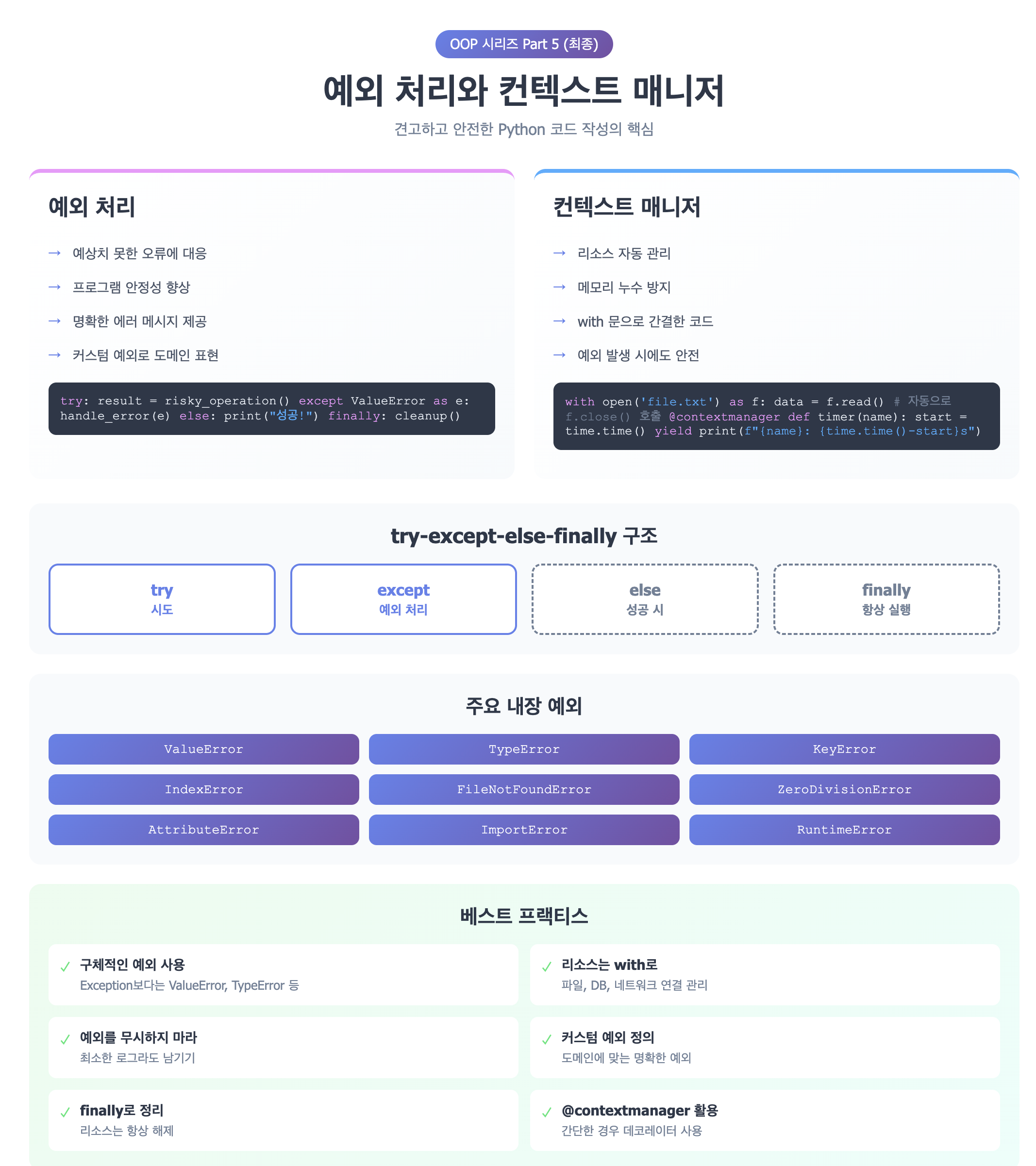
1. 예외 처리 기본
try-except 기본 구조
try:
    # 예외가 발생할 수 있는 코드
    result = 10 / 0
except ZeroDivisionError:
    # 예외 처리
    print("0으로 나눌 수 없습니다!")
여러 예외 처리하기
def safe_divide(a, b):
    try:
        result = a / b
        return result
    except ZeroDivisionError:
        print("0으로 나눌 수 없습니다!")
        return None
    except TypeError:
        print("숫자만 입력 가능합니다!")
        return None

print(safe_divide(10, 2))     # 5.0
print(safe_divide(10, 0))     # 0으로 나눌 수 없습니다! None
print(safe_divide(10, "a"))   # 숫자만 입력 가능합니다! None
여러 예외를 한 번에 처리
try:
    value = int(input("숫자 입력: "))
    result = 100 / value
except (ValueError, ZeroDivisionError) as e:
    print(f"오류 발생: {e}")
2. 예외 객체 활용
예외 정보 얻기
try:
    with open("없는파일.txt", "r") as f:
        content = f.read()
except FileNotFoundError as e:
    print(f"파일을 찾을 수 없습니다: {e}")
    print(f"예외 타입: {type(e)}")
    print(f"예외 메시지: {str(e)}")
모든 예외 잡기 (비권장)
try:
    # 위험한 코드
    risky_operation()
except Exception as e:
    print(f"예상치 못한 오류: {e}")
    # 하지만 가능하면 구체적인 예외를 잡는 게 좋음!
3. else와 finally
else: 예외가 발생하지 않았을 때
def read_file(filename):
    try:
        f = open(filename, 'r')
    except FileNotFoundError:
        print("파일이 없습니다.")
    else:
        # try 블록이 성공했을 때만 실행
        content = f.read()
        f.close()
        return content

print(read_file("data.txt"))
finally: 항상 실행
def process_file(filename):
    f = None
    try:
        f = open(filename, 'r')
        data = f.read()
        return data
    except FileNotFoundError:
        print("파일을 찾을 수 없습니다.")
        return None
    finally:
        # 예외 발생 여부와 관계없이 항상 실행
        if f:
            f.close()
            print("파일을 닫았습니다.")

process_file("test.txt")
완전한 구조
try:
    # 예외가 발생할 수 있는 코드
    result = dangerous_operation()
except SomeException as e:
    # 예외 처리
    handle_error(e)
else:
    # 예외가 발생하지 않았을 때
    print("성공!")
finally:
    # 항상 실행 (정리 작업)
    cleanup()
4. 예외 발생시키기 (raise)
기본 예외 발생
def validate_age(age):
    if age < 0:
        raise ValueError("나이는 음수일 수 없습니다!")
    if age > 150:
        raise ValueError("나이가 너무 많습니다!")
    return True

try:
    validate_age(-5)
except ValueError as e:
    print(f"유효성 검사 실패: {e}")
예외 다시 발생시키기
def process_data(data):
    try:
        # 데이터 처리
        result = complex_operation(data)
    except Exception as e:
        print(f"로그: 오류 발생 - {e}")
        raise  # 예외를 다시 발생시켜 상위로 전파

try:
    process_data(None)
except Exception:
    print("상위에서 예외 처리")
5. 커스텀 예외 만들기
사용자 정의 예외
class InsufficientFundsError(Exception):
    """잔액 부족 예외"""
    def __init__(self, balance, amount):
        self.balance = balance
        self.amount = amount
        message = f"잔액 부족: {balance}원 있음, {amount}원 필요"
        super().__init__(message)

class BankAccount:
    def __init__(self, balance):
        self.balance = balance

    def withdraw(self, amount):
        if amount > self.balance:
            raise InsufficientFundsError(self.balance, amount)
        self.balance -= amount
        return self.balance

# 사용
account = BankAccount(10000)
try:
    account.withdraw(15000)
except InsufficientFundsError as e:
    print(f"출금 실패: {e}")
    print(f"현재 잔액: {e.balance}원")
    print(f"필요 금액: {e.amount}원")
예외 계층 구조
class ValidationError(Exception):
    """기본 검증 오류"""
    pass

class EmailValidationError(ValidationError):
    """이메일 검증 오류"""
    pass

class PasswordValidationError(ValidationError):
    """비밀번호 검증 오류"""
    pass

def validate_user(email, password):
    if "@" not in email:
        raise EmailValidationError("유효하지 않은 이메일 형식")
    if len(password) < 8:
        raise PasswordValidationError("비밀번호는 8자 이상이어야 합니다")

try:
    validate_user("test", "123")
except EmailValidationError as e:
    print(f"이메일 오류: {e}")
except PasswordValidationError as e:
    print(f"비밀번호 오류: {e}")
except ValidationError as e:
    # 모든 검증 오류를 잡음
    print(f"검증 오류: {e}")
6. 컨텍스트 매니저 (Context Manager)
컨텍스트 매니저는 with 문과 함께 사용하여 리소스를 안전하게 관리한다.
with 문 기본
# 나쁜 예: 파일을 닫지 않을 수 있음
f = open("data.txt", "r")
data = f.read()
f.close()  # 예외 발생 시 실행 안 됨!

# 좋은 예: 자동으로 파일 닫힘
with open("data.txt", "r") as f:
    data = f.read()
# 여기서 자동으로 f.close() 호출됨
여러 리소스 관리
with open("input.txt", "r") as infile, open("output.txt", "w") as outfile:
    content = infile.read()
    outfile.write(content.upper())
# 두 파일 모두 자동으로 닫힘
7. 커스텀 컨텍스트 매니저 만들기
클래스 기반 컨텍스트 매니저
class DatabaseConnection:
    def __init__(self, db_name):
        self.db_name = db_name
        self.connection = None

    def __enter__(self):
        print(f"{self.db_name} 연결 중...")
        self.connection = f"Connection to {self.db_name}"
        return self.connection

    def __exit__(self, exc_type, exc_val, exc_tb):
        print(f"{self.db_name} 연결 종료")
        if exc_type is not None:
            print(f"예외 발생: {exc_type.__name__}: {exc_val}")
        # False 반환 시 예외가 전파됨
        # True 반환 시 예외를 억제
        return False

# 사용
with DatabaseConnection("mydb") as conn:
    print(f"연결됨: {conn}")
    # 작업 수행
# 자동으로 연결 종료
예외 처리가 있는 컨텍스트 매니저
class FileManager:
    def __init__(self, filename, mode):
        self.filename = filename
        self.mode = mode
        self.file = None

    def __enter__(self):
        try:
            self.file = open(self.filename, self.mode)
            return self.file
        except FileNotFoundError:
            print(f"파일을 찾을 수 없습니다: {self.filename}")
            raise

    def __exit__(self, exc_type, exc_val, exc_tb):
        if self.file:
            self.file.close()
            print("파일이 안전하게 닫혔습니다.")

        if exc_type is IOError:
            print("IO 오류가 발생했지만 처리했습니다.")
            return True  # 예외를 억제
        return False

# 사용
try:
    with FileManager("test.txt", "r") as f:
        content = f.read()
except FileNotFoundError:
    print("파일 처리 실패")
8. @contextmanager 데코레이터
더 간단하게 컨텍스트 매니저를 만들 수 있다.
from contextlib import contextmanager

@contextmanager
def timer(name):
    import time
    print(f"{name} 시작")
    start = time.time()
    try:
        yield  # with 블록이 실행되는 지점
    finally:
        end = time.time()
        print(f"{name} 완료: {end - start:.4f}초")

# 사용
with timer("데이터 처리"):
    # 시간을 측정할 작업
    total = sum(range(1000000))
    print(f"합계: {total}")
값을 반환하는 컨텍스트 매니저
from contextlib import contextmanager

@contextmanager
def temporary_setting(setting_name, new_value):
    import os
    old_value = os.environ.get(setting_name)

    # 설정 변경
    os.environ[setting_name] = new_value
    print(f"{setting_name} 변경: {old_value} → {new_value}")

    try:
        yield new_value  # with 문에 값 전달
    finally:
        # 원래 설정으로 복구
        if old_value is None:
            os.environ.pop(setting_name, None)
        else:
            os.environ[setting_name] = old_value
        print(f"{setting_name} 복구: {new_value} → {old_value}")

# 사용
with temporary_setting("DEBUG", "true") as debug:
    print(f"디버그 모드: {debug}")
    # 디버그 환경에서 작업
# 자동으로 원래 설정으로 복구
9. 실전 예제: 파일 처리 시스템
from contextlib import contextmanager
import json
import logging

# 로깅 설정
logging.basicConfig(level=logging.INFO)
logger = logging.getLogger(__name__)

class FileProcessingError(Exception):
    """파일 처리 오류"""
    pass

@contextmanager
def safe_file_operation(filename, mode='r'):
    """안전한 파일 작업을 위한 컨텍스트 매니저"""
    file_obj = None
    try:
        logger.info(f"파일 열기: {filename} (모드: {mode})")
        file_obj = open(filename, mode, encoding='utf-8')
        yield file_obj
    except FileNotFoundError:
        logger.error(f"파일을 찾을 수 없습니다: {filename}")
        raise FileProcessingError(f"파일 없음: {filename}")
    except PermissionError:
        logger.error(f"파일 접근 권한이 없습니다: {filename}")
        raise FileProcessingError(f"권한 없음: {filename}")
    except Exception as e:
        logger.error(f"예상치 못한 오류: {e}")
        raise
    finally:
        if file_obj:
            file_obj.close()
            logger.info(f"파일 닫기: {filename}")

class DataProcessor:
    def __init__(self, input_file, output_file):
        self.input_file = input_file
        self.output_file = output_file

    def process(self):
        """데이터 처리 메인 로직"""
        try:
            data = self._read_data()
            processed_data = self._transform_data(data)
            self._write_data(processed_data)
            logger.info("데이터 처리 완료")
            return True
        except FileProcessingError as e:
            logger.error(f"파일 처리 실패: {e}")
            return False
        except json.JSONDecodeError as e:
            logger.error(f"JSON 파싱 실패: {e}")
            return False
        except Exception as e:
            logger.error(f"처리 중 오류 발생: {e}")
            return False

    def _read_data(self):
        """파일에서 데이터 읽기"""
        with safe_file_operation(self.input_file, 'r') as f:
            return json.load(f)

    def _transform_data(self, data):
        """데이터 변환"""
        if not isinstance(data, list):
            raise ValueError("데이터는 리스트 형식이어야 합니다")

        processed = []
        for item in data:
            if 'name' not in item or 'value' not in item:
                logger.warning(f"잘못된 데이터 형식: {item}")
                continue

            processed.append({
                'name': item['name'].upper(),
                'value': item['value'] * 2,
                'processed': True
            })

        return processed

    def _write_data(self, data):
        """파일에 데이터 쓰기"""
        with safe_file_operation(self.output_file, 'w') as f:
            json.dump(data, f, indent=2, ensure_ascii=False)

# 사용 예시
if __name__ == "__main__":
    processor = DataProcessor("input.json", "output.json")

    # 입력 파일 생성 (테스트용)
    with safe_file_operation("input.json", "w") as f:
        json.dump([
            {"name": "apple", "value": 10},
            {"name": "banana", "value": 20},
            {"name": "cherry", "value": 15}
        ], f)

    # 데이터 처리
    success = processor.process()
    if success:
        print("✅ 처리 성공!")
    else:
        print("❌ 처리 실패!")
10. 주요 내장 예외
| 예외 | 발생 상황 |
| ValueError | 잘못된 값 |
| TypeError | 잘못된 타입 |
| KeyError | 딕셔너리 키 없음 |
| IndexError | 인덱스 범위 초과 |
| FileNotFoundError | 파일 없음 |
| ZeroDivisionError | 0으로 나눔 |
| AttributeError | 속성 없음 |
| ImportError | 임포트 실패 |
| RuntimeError | 일반적 실행 오류 |
| StopIteration | 반복자 종료 |
핵심 요약
예외 처리 베스트 프랙티스
- 구체적인 예외를 잡아라: except Exception보다는 except ValueError
- 예외를 무시하지 마라: 최소한 로그라도 남겨라
- finally로 정리하라: 리소스는 항상 정리
- 커스텀 예외를 만들어라: 도메인에 맞는 예외 정의
- 컨텍스트 매니저를 사용하라: with로 안전하게
컨텍스트 매니저 베스트 프랙티스
- 리소스 관리에 사용: 파일, 데이터베이스, 네트워크 연결
- 임시 상태 관리: 설정 변경, 트랜잭션
- 시간 측정, 로깅: 성능 모니터링
- @contextmanager 활용: 간단한 경우 데코레이터 사용
결론
예외 처리와 컨텍스트 매니저를 잘 활용하면
- 예상치 못한 오류에 대응 가능
- 리소스 누수 방지
- 코드의 안정성과 신뢰성 향상
- 유지보수하기 쉬운 코드 작성
견고한 프로그램은 예외를 잘 처리하는 프로그램이다!
Reference
- Python Errors and Exceptions: https://docs.python.org/3/tutorial/errors.html
- Built-in Exceptions: https://docs.python.org/3/library/exceptions.html
- contextlib: https://docs.python.org/3/library/contextlib.html
- Python Tips: https://book.pythontips.com/en/latest/context_managers.html
- Python Engineer: https://www.python-engineer.com/courses/advancedpython/21-contextmanagers/
- Earthly Blog: https://earthly.dev/blog/python-with-statement/
- Siv Scripts: https://alysivji.com/managing-resources-with-context-managers-pythonic.html
728x90
반응형
'Launguage' 카테고리의 다른 글
| Python TypeVar와 제네릭, 제대로 알고 쓰자 (0) | 2026.01.02 |
|---|---|
| Python 상속과 다형성 완벽 가이드 (0) | 2025.12.05 |
| Python 클래스 데코레이터 완벽 가이드 (0) | 2025.11.21 |
| Python 매직 메서드 완벽 가이드 (0) | 2025.11.07 |
| Python 메서드의 3가지 종류: Instance, Class, Static Method 완벽 정리 (1) | 2025.10.24 |