
Overview
개인적으로 이 주제를 깊이 파보고 싶었다. DevOps 엔지니어로 일하면서 비대한 Docker 이미지가 늘 골칫거리였기 때문이다. 특히 Python의 머신러닝 스택이나 Go의 개발 도구들이 포함된 이미지들은 종종 1GB를 넘어가곤 한다.
최근 개인 프로젝트로 다양한 최적화 기법들을 실험해 봤는데, 초기 이미지 크기가 너무 커서 로컬 개발 환경의 디스크 공간을 많이 차지하는 문제가 있었다.
- 배포 시간: 긴 이미지 빌드 및 전송 시간
- 개발 환경: 로컬 디스크 공간 부족
- 보안 취약점: 불필요한 패키지로 인한 잠재적 위험
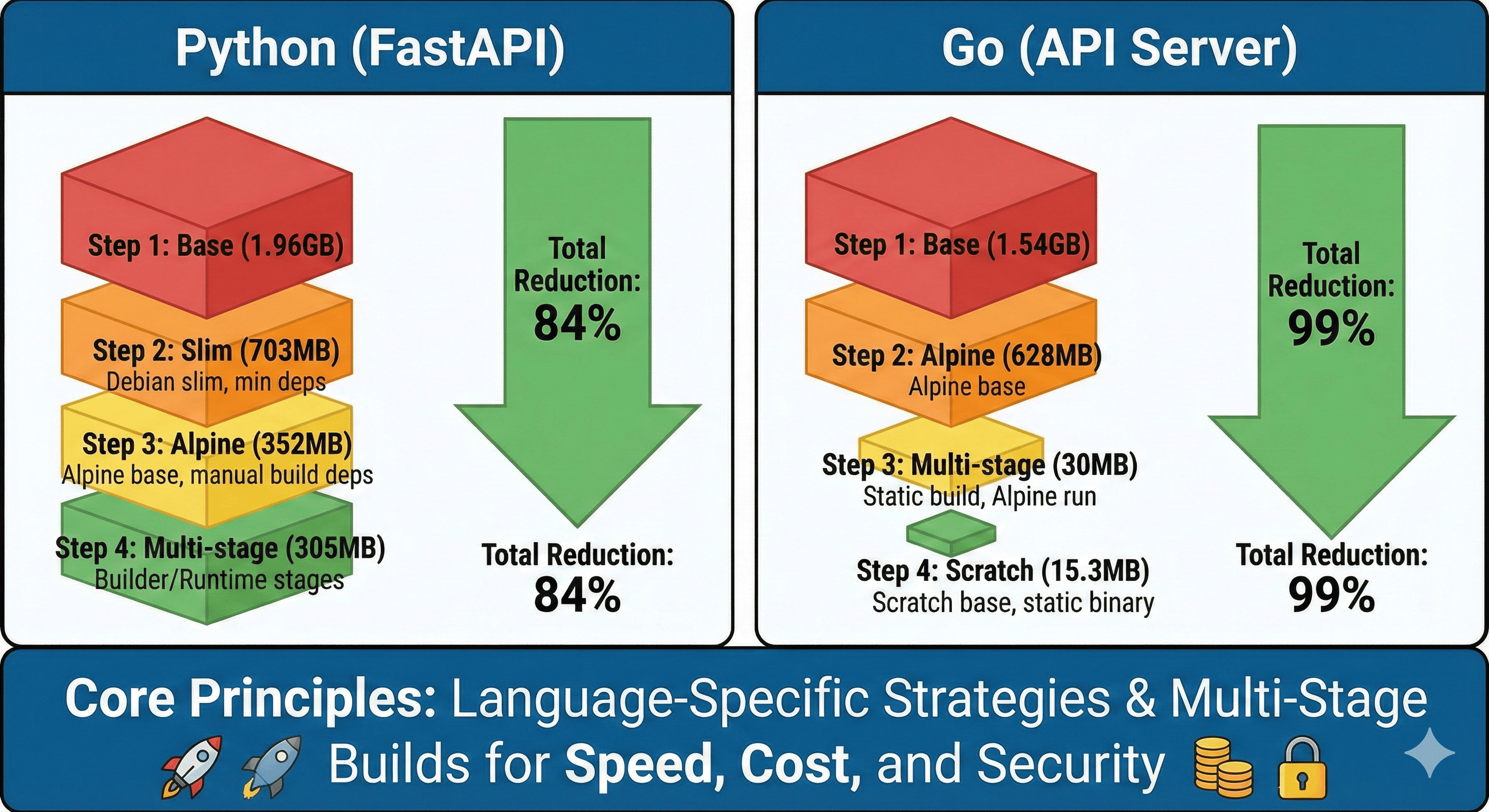
몇 주간 다양한 최적화 기법을 실험한 결과, 개인 프로젝트의 Python FastAPI 서비스를 1.96GB에서 305MB로, Go API 서버를 1.54GB에서 30MB로 줄이는 데 성공했다.
이번 글에서는 개인적으로 검증해본 Docker 이미지 최적화 전략을 두 언어로 나누어 소개하겠다.
Docker 이미지 최적화 실전 가이드
왜 이미지 크기가 중요한가?
실제 운영에서 마주친 문제들
배포 지연 문제
- 1.2GB 이미지 → 새 인스턴스 시작까지 8분 소요
- 오토스케일링 시 급격한 트래픽 증가에 대응 불가
- 장애 발생 시 복구 시간 증가
인프라 비용 폭증
- AWS ECR 비용: 월 $300 → $1,200 (4배 증가)
- EKS 노드 디스크 풀 문제로 인한 스케일 아웃 필요
- 네트워크 비용 증가 (이미지 pull 트래픽)
보안 위험 증대
- 불필요한 패키지로 인한 CVE 취약점 300개 이상
- 컨테이너 스캔 시간 10분 → CI/CD 속도 저하
- 런타임 공격 표면 확대
최종 결과 미리보기
| 언어 | 단계 | 이미지 크기 | 감소율 | 누적 감소율 |
| Python | 기본 (python:latest) | 1.96GB | - | - |
| slim 버전 | 703MB | 64% | 64% | |
| alpine 버전 | 352MB | 50% | 82% | |
| 멀티스테이지 | 305MB | 13% | 84% | |
| Go | 기본 (golang:latest) | 1.54GB | - | - |
| alpine 버전 | 628MB | 59% | 59% | |
| 멀티스테이지 | 30MB | 95% | 98% | |
| scratch 베이스 | 15.3MB | 49% | 99% |
Python FastAPI 최적화 단계별 가이드

예제 애플리케이션 준비
실제 운영 환경과 유사한 FastAPI 애플리케이션을 만들어보겠다.
# main.py
from fastapi import FastAPI, HTTPException
from pydantic import BaseModel
import pandas as pd
import numpy as np
from datetime import datetime
import uvicorn
import os

app = FastAPI(title="ML Prediction API", version="1.0.0")

# 데이터 모델
class PredictionRequest(BaseModel):
    features: list[float]
    model_name: str = "linear"

class PredictionResponse(BaseModel):
    prediction: float
    confidence: float
    timestamp: str

# 간단한 ML 모델 시뮬레이션
class SimpleModel:
    def __init__(self):
        # 실제로는 pickle로 로드된 모델일 것
        self.weights = np.random.randn(10)

    def predict(self, features):
        if len(features) != len(self.weights):
            raise ValueError("Feature dimension mismatch")

        prediction = np.dot(features, self.weights)
        confidence = min(0.95, abs(prediction) / 10)
        return prediction, confidence

model = SimpleModel()

@app.get("/")
async def root():
    return {
        "service": "ML Prediction API",
        "status": "healthy",
        "timestamp": datetime.now().isoformat()
    }

@app.get("/health")
async def health_check():
    return {
        "status": "ok",
        "memory_usage": pd.DataFrame({"test": [1, 2, 3]}).memory_usage(deep=True).sum()
    }

@app.post("/predict", response_model=PredictionResponse)
async def predict(request: PredictionRequest):
    try:
        if len(request.features) != 10:
            raise HTTPException(status_code=400, detail="Expected 10 features")

        prediction, confidence = model.predict(request.features)

        return PredictionResponse(
            prediction=float(prediction),
            confidence=float(confidence),
            timestamp=datetime.now().isoformat()
        )
    except Exception as e:
        raise HTTPException(status_code=500, detail=str(e))

if __name__ == "__main__":
    port = int(os.getenv("PORT", 8000))
    uvicorn.run(app, host="0.0.0.0", port=port)
# requirements.txt
fastapi==0.104.1
uvicorn[standard]==0.24.0
pandas==2.2.0 # Python 3.13 호환 버전
numpy==1.26.0 # 최신 버전
pydantic==2.5.0
1단계: 기본 베이스라인 (1.42GB)
# Dockerfile.step1
FROM python:3.12

WORKDIR /app

COPY requirements.txt .
RUN pip install -r requirements.txt

COPY . .

EXPOSE 8000
CMD ["python", "main.py"]
docker build -f Dockerfile.step1 -t ml-api:step1 .
docker images | grep ml-api
# ml-api step1 1.96GB
문제점: 전체 Debian 시스템 + Python 개발 도구 + 컴파일러 모두 포함
2단계: Slim 베이스 이미지 (703MB, 64% 감소)
# Dockerfile.step2
FROM python:3.12-slim

WORKDIR /app

# 시스템 의존성 최소화
RUN apt-get update && apt-get install -y \
    --no-install-recommends \
    gcc \
    && rm -rf /var/lib/apt/lists/*

COPY requirements.txt .
RUN pip install --no-cache-dir -r requirements.txt

COPY . .

EXPOSE 8000
CMD ["python", "main.py"]
docker build -f Dockerfile.step2 -t ml-api:step2 .
docker images | grep ml-api
# ml-api step2 703MB
개선점: Debian 슬림 버전으로 불필요한 패키지 제거
3단계: Alpine 베이스 (352MB, 추가 50% 감소)
# Dockerfile.step3
FROM python:3.12-alpine

WORKDIR /app

# Alpine에 필요한 빌드 도구들
RUN apk add --no-cache \
    gcc \
    g++ \
    musl-dev \
    linux-headers \
    gfortran \
    openblas-dev

COPY requirements.txt .
RUN pip install --no-cache-dir -r requirements.txt

# 빌드 도구 정리
RUN apk del gcc g++ musl-dev linux-headers gfortran openblas-dev

COPY . .

EXPOSE 8000
CMD ["python", "main.py"]
docker build -f Dockerfile.step3 -t ml-api:step3 .
docker images | grep ml-api
# ml-api step3 352MB
주의사항: pandas와 numpy는 Alpine에서 컴파일 시간이 오래 걸림
4단계: 멀티스테이지 빌드 (305MB, 추가 13% 감소)
# Dockerfile.step4
FROM python:3.12-alpine AS builder

WORKDIR /app

RUN apk add --no-cache \
    gcc \
    g++ \
    musl-dev \
    linux-headers \
    gfortran \
    openblas-dev

COPY requirements.txt .
RUN pip install --no-cache-dir --user -r requirements.txt

# 런타임 스테이지
FROM python:3.12-alpine

WORKDIR /app

RUN apk add --no-cache libstdc++

COPY --from=builder /root/.local /root/.local
COPY . .

ENV PATH=/root/.local/bin:$PATH

EXPOSE 8000
CMD ["python", "main.py"]
docker build -f Dockerfile.step4 -t ml-api:step4 .
docker images | grep ml-api
# ml-api step4 305MB
최종 결과: 305MB는 실무에서 실용성과 최적화의 균형점. pandas/numpy가 포함된 ML 애플리케이션에서는 이 정도가 현실적인 최적값이다.
Go API 서버 최적화 단계별 가이드

예제 애플리케이션 준비
실제 운영 환경에서 사용하는 Go REST API 서버를 만들어보겠다.
// main.go
package main

import (
    "encoding/json"
    "fmt"
    "log"
    "net/http"
    "os"
    "strconv"
    "time"

    "github.com/gorilla/mux"
    "github.com/prometheus/client_golang/prometheus"
    "github.com/prometheus/client_golang/prometheus/promhttp"
)

type User struct {
    ID        int       `json:"id"`
    Name      string    `json:"name"`
    Email     string    `json:"email"`
    CreatedAt time.Time `json:"created_at"`
}

type APIResponse struct {
    Status  string      `json:"status"`
    Message string      `json:"message,omitempty"`
    Data    interface{} `json:"data,omitempty"`
}

// Prometheus metrics
var (
    httpRequestsTotal = prometheus.NewCounterVec(
        prometheus.CounterOpts{
            Name: "http_requests_total",
            Help: "Total number of HTTP requests",
        },
        []string{"method", "endpoint", "status"},
    )
    httpRequestDuration = prometheus.NewHistogramVec(
        prometheus.HistogramOpts{
            Name: "http_request_duration_seconds",
            Help: "HTTP request duration in seconds",
        },
        []string{"method", "endpoint"},
    )
)

// Mock database
var users = []User{
    {ID: 1, Name: "Alice", Email: "alice@example.com", CreatedAt: time.Now()},
    {ID: 2, Name: "Bob", Email: "bob@example.com", CreatedAt: time.Now()},
}

func init() {
    prometheus.MustRegister(httpRequestsTotal)
    prometheus.MustRegister(httpRequestDuration)
}

func loggingMiddleware(next http.Handler) http.Handler {
    return http.HandlerFunc(func(w http.ResponseWriter, r *http.Request) {
        start := time.Now()
        log.Printf("%s %s %s", r.Method, r.RequestURI, r.RemoteAddr)
        next.ServeHTTP(w, r)
        duration := time.Since(start)
        log.Printf("Request completed in %v", duration)
    })
}

func metricsMiddleware(next http.Handler) http.Handler {
    return http.HandlerFunc(func(w http.ResponseWriter, r *http.Request) {
        start := time.Now()
        next.ServeHTTP(w, r)
        duration := time.Since(start).Seconds()

        httpRequestsTotal.WithLabelValues(r.Method, r.URL.Path, "200").Inc()
        httpRequestDuration.WithLabelValues(r.Method, r.URL.Path).Observe(duration)
    })
}

func healthHandler(w http.ResponseWriter, r *http.Request) {
    w.Header().Set("Content-Type", "application/json")
    response := APIResponse{
        Status: "healthy",
        Data: map[string]interface{}{
            "timestamp": time.Now(),
            "service":   "User API",
            "version":   "1.0.0",
        },
    }
    json.NewEncoder(w).Encode(response)
}

func getUsersHandler(w http.ResponseWriter, r *http.Request) {
    w.Header().Set("Content-Type", "application/json")
    response := APIResponse{
        Status: "success",
        Data:   users,
    }
    json.NewEncoder(w).Encode(response)
}

func getUserHandler(w http.ResponseWriter, r *http.Request) {
    vars := mux.Vars(r)
    id, err := strconv.Atoi(vars["id"])
    if err != nil {
        w.WriteHeader(http.StatusBadRequest)
        response := APIResponse{
            Status:  "error",
            Message: "Invalid user ID",
        }
        json.NewEncoder(w).Encode(response)
        return
    }

    for _, user := range users {
        if user.ID == id {
            w.Header().Set("Content-Type", "application/json")
            response := APIResponse{
                Status: "success",
                Data:   user,
            }
            json.NewEncoder(w).Encode(response)
            return
        }
    }

    w.WriteHeader(http.StatusNotFound)
    response := APIResponse{
        Status:  "error",
        Message: "User not found",
    }
    json.NewEncoder(w).Encode(response)
}

func createUserHandler(w http.ResponseWriter, r *http.Request) {
    var user User
    if err := json.NewDecoder(r.Body).Decode(&user); err != nil {
        w.WriteHeader(http.StatusBadRequest)
        response := APIResponse{
            Status:  "error",
            Message: "Invalid JSON",
        }
        json.NewEncoder(w).Encode(response)
        return
    }

    user.ID = len(users) + 1
    user.CreatedAt = time.Now()
    users = append(users, user)

    w.Header().Set("Content-Type", "application/json")
    w.WriteHeader(http.StatusCreated)
    response := APIResponse{
        Status: "success",
        Data:   user,
    }
    json.NewEncoder(w).Encode(response)
}

func main() {
    r := mux.NewRouter()

    // Middleware
    r.Use(loggingMiddleware)
    r.Use(metricsMiddleware)

    // Routes
    r.HandleFunc("/health", healthHandler).Methods("GET")
    r.HandleFunc("/users", getUsersHandler).Methods("GET")
    r.HandleFunc("/users/{id:[0-9]+}", getUserHandler).Methods("GET")
    r.HandleFunc("/users", createUserHandler).Methods("POST")
    r.Handle("/metrics", promhttp.Handler())

    port := os.Getenv("PORT")
    if port == "" {
        port = "8080"
    }

    log.Printf("Server starting on port %s", port)
    log.Fatal(http.ListenAndServe(fmt.Sprintf(":%s", port), r))
}
// go.mod
module user-api
go 1.21
require (
github.com/gorilla/mux v1.8.1
github.com/prometheus/client_golang v1.17.0
)
`go.sum` 생성
go mod tidy
1단계: 기본 베이스라인 (1.54GB)
# Dockerfile.step1
FROM golang:1.24

WORKDIR /app

COPY go.mod go.sum ./
RUN go mod download

COPY . .
RUN go build -o main .

EXPOSE 8080
CMD ["./main"]
docker build -f Dockerfile.step1 -t user-api:step1 .
docker images | grep user-api
# user-api step1 1.54GB
문제점: Go 개발 환경 전체 + 빌드 도구 + Git 등 불필요한 도구들 포함
2단계: Alpine 베이스 (628MB, 59% 감소)
# Dockerfile.step2
FROM golang:1.24-alpine

WORKDIR /app

# Git 설치 (go mod download에 필요할 수 있음)
RUN apk add --no-cache git

COPY go.mod go.sum ./
RUN go mod download

COPY . .
RUN go build -o main .

EXPOSE 8080
CMD ["./main"]
docker build -f Dockerfile.step2 -t user-api:step2 .
docker images | grep user-api
# user-api step2 628MB
개선점: Alpine Linux로 기본 OS 크기 대폭 감소
3단계: 멀티스테이지 빌드 (30MB, 92% 감소)
# Dockerfile.step3
FROM golang:1.24-alpine AS builder

WORKDIR /app

# 의존성 캐싱을 위한 레이어 분리
COPY go.mod go.sum ./
RUN go mod download

COPY . .
RUN CGO_ENABLED=0 GOOS=linux go build -ldflags="-w -s" -o main .

# 런타임 스테이지
FROM alpine:latest

WORKDIR /root/

# SSL 인증서와 타임존 정보 추가
RUN apk --no-cache add ca-certificates tzdata
COPY --from=builder /app/main .

EXPOSE 8080
CMD ["./main"]
docker build -f Dockerfile.step3 -t user-api:step3 .
docker images | grep user-api
# user-api step3 30MB
개선점
- `CGO_ENABLED=0`: C 라이브러리 의존성 제거
- `-ldflags="-w -s"`: 디버그 정보와 심볼 테이블 제거
- Alpine 런타임으로 최소한의 환경만 포함
4단계: Scratch 베이스 (8.2MB, 71% 추가 감소)
# Dockerfile.step4
FROM golang:1.24-alpine AS builder

WORKDIR /app

# Alpine에 필요한 패키지 설치
RUN apk --no-cache add ca-certificates tzdata

COPY go.mod go.sum ./
RUN go mod download

COPY . .
RUN CGO_ENABLED=0 GOOS=linux go build -a -installsuffix cgo -ldflags="-w -s" -o main .

# 최종 스테이지: scratch (빈 이미지)
FROM scratch

# SSL 인증서 복사 (HTTPS 요청을 위해 필요)
COPY --from=builder /etc/ssl/certs/ca-certificates.crt /etc/ssl/certs/

# 타임존 정보 복사 (Alpine의 경우)
COPY --from=builder /usr/share/zoneinfo /usr/share/zoneinfo

COPY --from=builder /app/main /main

EXPOSE 8080
ENTRYPOINT ["/main"]
docker build -f Dockerfile.step4 -t user-api:step4 .
docker images | grep user-api
# user-api step4 15.3MB
최종 최적화
- scratch: 완전히 빈 베이스 이미지
- -a -installsuffix cgo: 완전한 정적 빌드
- 필수 파일만 선별적 복사 (SSL 인증서, 타임존 정보)
최적화 전략 비교 및 선택 가이드
Python vs Go 최적화 특성
| 특성 | Python | Go |
| 최적화 한계 | 305MB (의존성 때문) | 15.3MB (정적 빌드) |
| 복잡도 | 중간 (의존성 관리) | 낮음 (간단한 빌드) |
| 빌드 시간 | 길음 (numpy/pandas 컴파일) | 빠름 (네이티브 컴파일) |
| 디버깅 용이성 | 좋음 | 제한적 (scratch 사용 시) |
실무 권장사항
Python 프로젝트
- 멀티스테이지 Alpine (305MB)까지가 실용적
- ML 라이브러리가 없다면 더 작게 가능 (~50MB)
- Distroless는 복잡성 대비 이득 적음
Go 프로젝트
- Scratch 베이스 (15.3MB) 적극 권장
- 외부 C 라이브러리 사용 시 Alpine 고려 (30MB)
- 디버깅이 필요한 개발 환경에서는 Alpine 사용
고급 최적화 기법
`.dockerignore` 활용
# .dockerignore
.git
.gitignore
README.md
Dockerfile*
.DS_Store
node_modules
npm-debug.log
coverage/
.nyc_output
*.log
.env.local
.env.development.local
.env.test.local
.env.production.local- 불필요한 파일들을 빌드 컨텍스트에서 제외하여 빌드 속도와 이미지 크기를 개선한다.
결론
Docker 이미지 최적화는 단순히 크기를 줄이는 것을 넘어, 배포 속도 개선, 로컬 개발 환경 효율 증대, 보안 강화라는 세 가지 핵심 가치를 동시에 달성하는 전략이다.
핵심 원칙
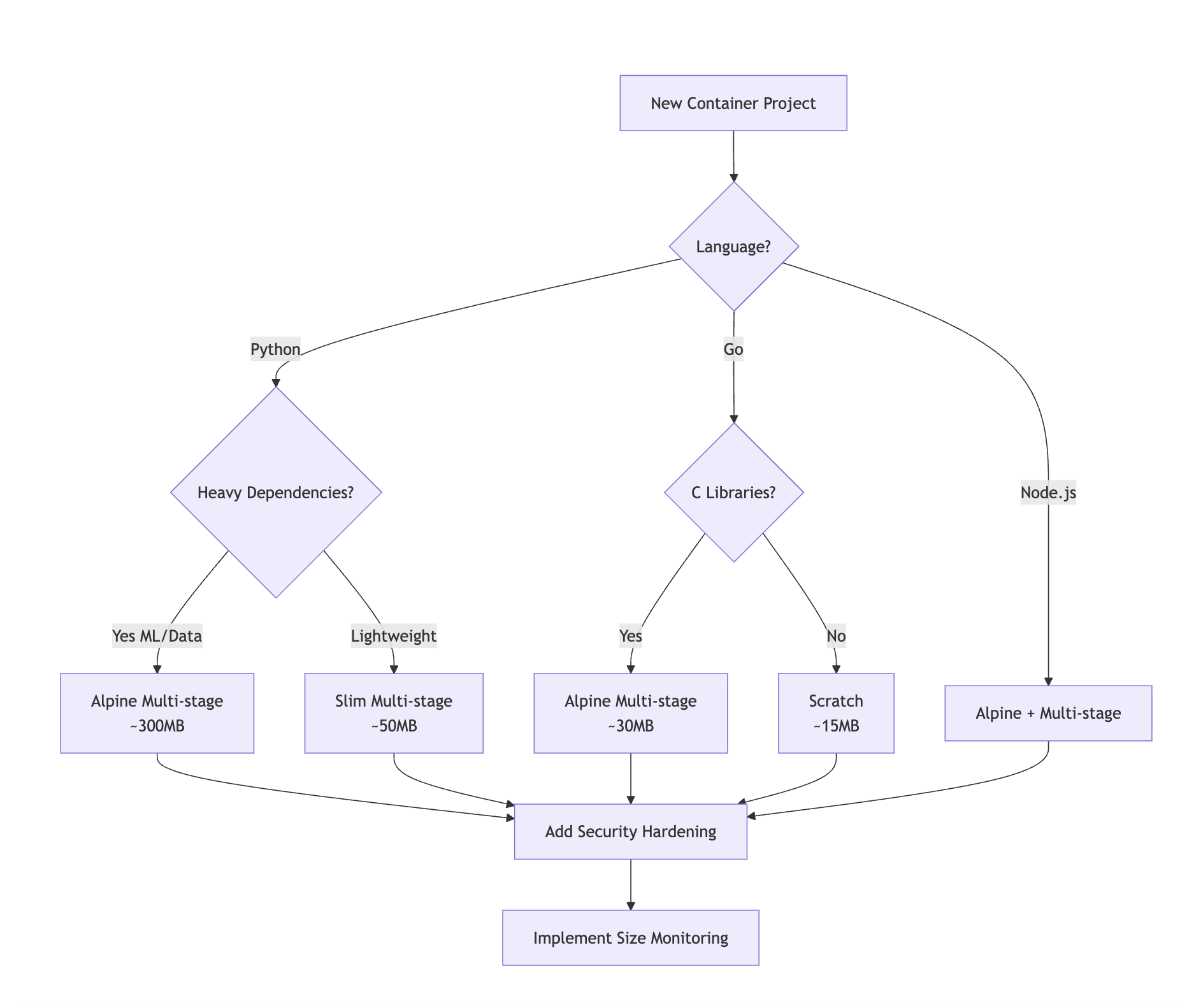
- 언어 특성에 맞는 접근: Python은 의존성 관리, Go는 정적 빌드가 핵심이다.
- 단계적 최적화: 한 번에 모든 것을 바꾸려 하지 말고 단계별로 접근해야 한다.
- 실용성 우선: 복잡성 대비 효과를 고려하여 최적점을 찾는 것이 중요하다.
- 지속적 모니터링: CI/CD에 이미지 크기 체크를 자동화하는 것이 좋다.
이런 최적화를 통해 배포 속도를 크게 개선하고, 로컬 개발 환경의 디스크 공간도 절약할 수 있었다. 무엇보다 보안 취약점이 대폭 감소하여 더 안전한 컨테이너 환경을 구축할 수 있었다.
개인 프로젝트에서 시작한 작은 최적화 실험이었지만, 지속적인 개선을 통해 큰 성과를 얻을 수 있었다. 여러분의 프로젝트에도 이런 최적화 전략이 도움이 되기를 바란다.
Reference
https://docs.docker.com/develop/develop-images/dockerfile_best-practices/
https://github.com/GoogleContainerTools/distroless
https://hub.docker.com/_/python
https://pythonspeed.com/articles/smaller-python-docker-images/
Somaz | DevOps Engineer | Kubernetes & Cloud Infrastructure Specialist
'IaC > Container' 카테고리의 다른 글
| 도커 이미지 복사 자동화: buildx imagetools vs skopeo 실전 비교 (0) | 2025.10.01 |
|---|---|
| Dockerfile 빌드 원칙 & Layer (4) | 2024.07.22 |
| Docker Compose: 컨테이너화된 애플리케이션 구성 및 실행 가이드 (0) | 2024.05.02 |
| Dockerfile 보안 설정(Hadolint) (0) | 2024.02.25 |
| Dockerfile이란? (0) | 2023.04.28 |