
728x90
반응형
Overview
Kubernetes 환경에서 애플리케이션을 배포할 때, Helm은 가장 널리 쓰이는 패키지 매니저이다.
하지만 여러 개의 Helm 차트를 동시에 다루거나, 환경별 변수 처리를 체계적으로 하고 싶을 때는 Helm 자체만으로는 부족함을 느끼게 된다.
이럴 때 필요한 것이 Helmfile이다.
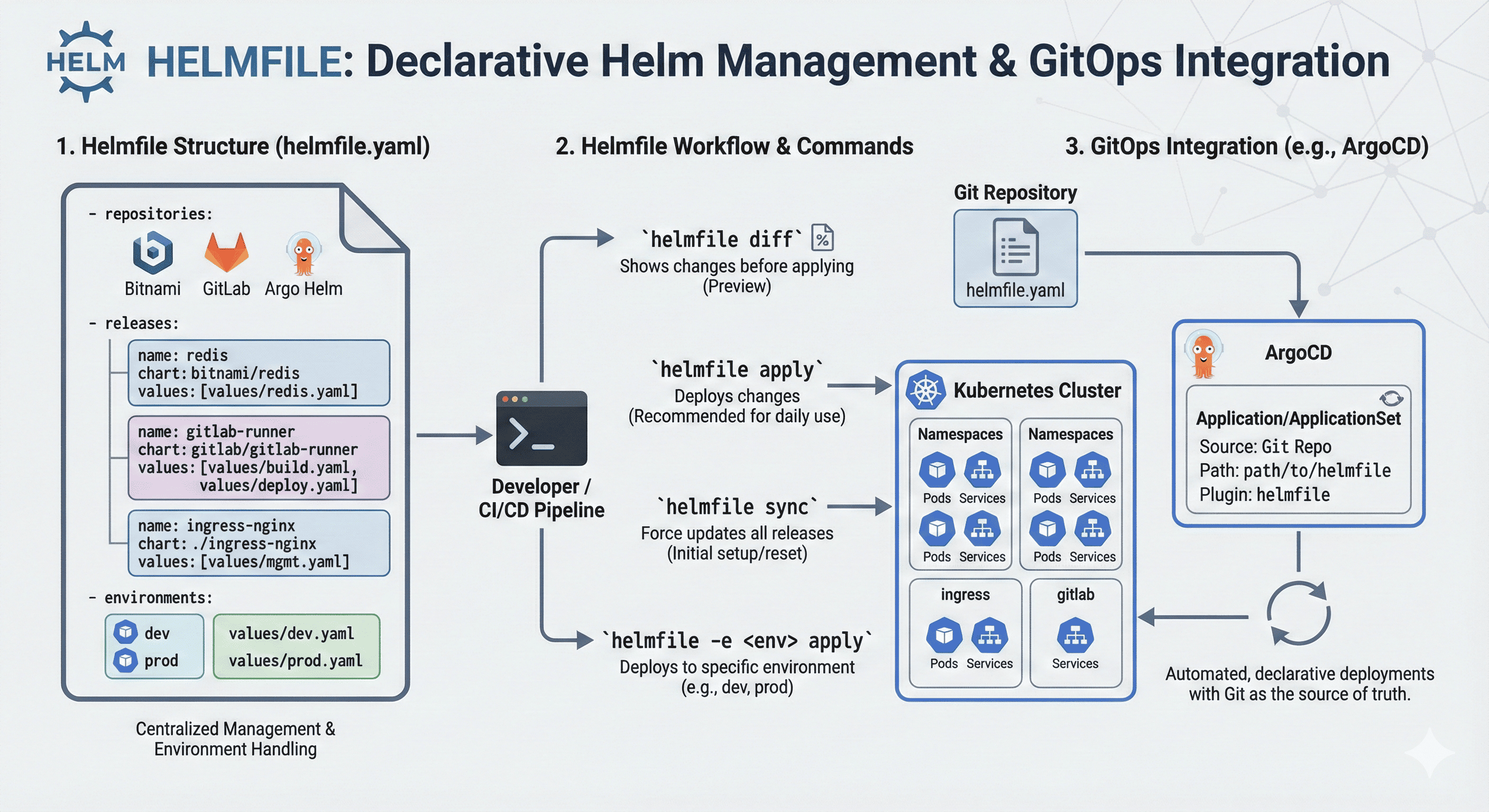
Helmfile은 Helm 기반 배포를 코드처럼 선언적으로 정의하고, 여러 차트를 일괄 관리할 수 있게 해주는 도구
Helmfile을 활용하면 다음과 같은 상황을 간결하게 처리할 수 있다.
- 여러 Helm 차트를 한 번에 배포
- dev/staging/prod 환경 분리 및 values 재사용
- GitOps/CD 도구와 통합
- 차트 버전, 이미지 태그, 레지스트리 관리의 일관성 확보
Helmfile 설치
brew install helmfile  # macOS
# 또는
curl -Lo helmfile https://github.com/helmfile/helmfile/releases/latest/download/helmfile_linux_amd64
chmod +x helmfile
sudo mv helmfile /usr/local/bin/
Helmfile 구조 살펴보기
기본 구조
# helmfile.yaml
repositories:
  - name: bitnami
    url: https://charts.bitnami.com/bitnami

releases:
  - name: redis
    namespace: default
    chart: bitnami/redis
    version: 17.1.3
    values:
      - values/redis-values.yaml
환경 분리 (helmfile.d or environments)
helmfile -e dev apply
helmfile -e prod apply
`helmfile.yaml` 예시
environments:
  dev:
    values:
      - values/dev.yaml
  prod:
    values:
      - values/prod.yaml
주요 명령어
| 명령어 | 설명 |
| `helmfile sync` | Helm 차트를 실제로 설치 또는 업데이트 |
| `helmfile apply` | diff 후 변경사항이 있을 때만 적용 (권장) |
| `helmfile diff` | 실제 적용 전 변경점 확인 |
| `helmfile template` | Helm 템플릿만 렌더링 |
| `helmfile destroy` | 배포된 Helm 리소스 삭제 |
| `helmfile -l name=build-image sync` | 특정 릴리스만 배포 |
| `helmfile -l name=old-build-deploy-image destroy` | 특정 릴리스만 삭제 |
| `helmfile -e dev apply` |
특정 환경(dev)으로 배포 (environments 사용 시) |
sync vs apply 차이점 상세 비교
| 항목 | `helmfile sync` | `helmfile apply` |
| 실행 방식 | 모든 릴리스 강제 동기화 | 변경사항 있는 릴리스만 배포 |
| revision 증가 여부 | 항상 증가 (helm upgrade 강제 실행됨) | 변경 없으면 유지됨 |
| 예시 상황 | 설정이 같아도 revision 1 → 2 | 설정이 같으면 revision 1 유지 |
| 권장 사용처 | 강제 재배포, 초기 설치 | 일상적인 배포, 변경 점검 후 진행 |
일상적인 배포에는 `helmfile apply` 를 추천! 변경 사항이 있는 릴리스만 업데이트되므로 효율적이고 안전하다.
모든 릴리스를 강제로 재배포해야 할 때만 `helmfile sync` 를 사용
실전 적용 예시
Gitlab Runner `helmfile.yaml` 예시
repositories:
  - name: gitlab
    url: https://charts.gitlab.io

releases:
  - name: build-image
    namespace: gitlab-runner
    chart: gitlab/gitlab-runner # Use External chart directory
    version: 0.71.0
    values:
      - values/build.yaml

  - name: deploy-image
    namespace: gitlab-runner
    chart: gitlab/gitlab-runner
    version: 0.71.0
    values:
      - values/deploy.yaml

  - name: old-build-deploy-image
    namespace: gitlab-runner
    chart: gitlab/gitlab-runner
    version: 0.70.3
    values:
      - values/old-gitlab-runner.yaml
Ingress Nginx `helmfile.yaml` 예시
repositories:
  - name: ingress-nginx
    url: https://kubernetes.github.io/ingress-nginx

releases:
  - name: ingress-nginx
    namespace: ingress-nginx
    chart: . # Use external directory (ingress-nginx/ingress-nginx)
    version: 4.12.0-beta.0 # Chart.yaml version reference
    values:
      - values/mgmt.yaml

  - name: ingress-nginx-public
    namespace: ingress-nginx
    chart: .
    version: 4.12.0-beta.0
    values:
      - values/mgmt-public.yaml

  - name: ingress-nginx-public-b
    namespace: ingress-nginx
    chart: .
    version: 4.12.0-beta.0
    values:
      - values/mgmt-public-b.yaml

  - name: ingress-nginx-public-c
    namespace: ingress-nginx
    chart: .
    version: 4.12.0-beta.0
    values:
      - values/mgmt-public-c.yaml

  - name: ingress-nginx-public-d
    namespace: ingress-nginx
    chart: .
    version: 4.12.0-beta.0
    values:
      - values/mgmt-public-d.yaml
Nginx Mariadb `helmfile.yaml` 예시
releases:
  - name: nginx
    namespace: web
    chart: bitnami/nginx
    version: 13.2.19
    values:
      - values/nginx.yaml

  - name: mariadb
    namespace: db
    chart: bitnami/mariadb
    version: 11.1.4
    values:
      - values/mariadb.yaml
Argocd `helmfile.yaml` 예시
repositories:
  - name: argo
    url: https://argoproj.github.io/argo-helm
  - name: dandydeveloper
    url: https://dandydeveloper.github.io/charts/

releases:
  - name: argocd
    namespace: argocd
    createNamespace: true
    chart: ./
    version: 7.7.0
    values:
      - values/mgmt.yaml

helmDefaults:
  wait: true
  timeout: 600
  atomic: true
  cleanupOnFail: true

# Hooks to ensure proper installation and upgrades
hooks:
  - events: ["presync"]
    showlogs: true
    command: "helm"
    args:
      - "dependency"
      - "update"
      - "."

  - events: ["presync"]
    showlogs: true
    command: "kubectl"
    args:
      - "create"
      - "namespace"
      - "argocd"
      - "--dry-run=client"
      - "-o"
      - "yaml"
      - "||"
- "true"- 저장소 설정
- Argo Helm 저장소 추가
- 릴리스 설정
- 이름 : argocd
- 네임스페이스: argocd (자동 생성)
- 차트 : 로컬 디렉토리 (./)
- 버전: 7.7.0 (`Chart.yaml` 과 동일)
- values: `values/mgmt.yaml` 사용
- Helm 기본 설정
- wait : 설치 완료까지 대기
- timeout: 600초(10분)
- atomic: 실패 시 롤백
- clenupOnFail : 실패 시 정리
- Hooks
- 설치 전 의존성 업데이트
- 네임스페이스 생성 확인
`Chart.yaml` 참고
apiVersion: v2
appVersion: v2.13.0
kubeVersion: ">=1.25.0-0"
description: A Helm chart for Argo CD, a declarative, GitOps continuous delivery tool for Kubernetes.
name: argo-cd
version: 7.7.0
home: https://github.com/argoproj/argo-helm
icon: https://argo-cd.readthedocs.io/en/stable/assets/logo.png
sources:
  - https://github.com/argoproj/argo-helm/tree/main/charts/argo-cd
  - https://github.com/argoproj/argo-cd
keywords:
  - argoproj
  - argocd
  - gitops
maintainers:
  - name: argoproj
    url: https://argoproj.github.io/
dependencies:
  - name: redis-ha
    version: 4.27.6
    repository: https://dandydeveloper.github.io/charts/
    condition: redis-ha.enabled
annotations:
  artifacthub.io/signKey: |
    fingerprint: 2B8F22F57260EFA67BE1C5824B11F800CD9D2252
    url: https://argoproj.github.io/argo-helm/pgp_keys.asc
  artifacthub.io/changes: |
    - kind: changed
      description: Bump argo-cd to v2.13.0
Helmfile + GitOps (예: ArgoCD)
Helmfile은 GitOps와도 찰떡궁합이다. 다음과 같이 사용할 수 있다.
- CI/CD 파이프라인에서 `helmfile apply` 실행
- ArgoCD에서 `helmfile` 기반 디렉토리 감시
- `kustomize + helmfile + sealed-secrets` 조합 가능
Application 예시
apiVersion: argoproj.io/v1alpha1
kind: Application
metadata:
  name: gitlab-runners
spec:
  source:
    repoURL: git@gitlab.somaz.link:server/argocd-applicationset.git
    path: kuberntes-infra/cicd/gitlab-runner  # helmfile.yaml이 있는 디렉토리
    plugin:
      name: helmfile  # ArgoCD에 helmfile 플러그인 설치 필요
  destination:
    server: https://kubernetes.default.svc
    namespace: gitlab-runner
ApplicationSet 예시
apiVersion: argoproj.io/v1alpha1
kind: ApplicationSet
metadata:
  name: gitlab-runners-applicationset
spec:
  generators:
    - list:
        elements:
          - name: build-image
            values: build.yaml
          - name: deploy-image
            values: deploy.yaml
  template:
    metadata:
      name: '{{name}}-runner'
    spec:
      source:
        repoURL: git@gitlab.somaz.link:server/argocd-applicationset.git
        path: kuberntes-infra/cicd/gitlab-runner
        plugin:
          name: helmfile
          env:
            - name: HELMFILE_RELEASE_NAME
              value: '{{name}}'
            - name: HELMFILE_VALUES_FILE
              value: 'values/{{values}}'
마무리
Helm은 쿠버네티스 환경에서 애플리케이션을 선언적으로 배포하는 훌륭한 도구이다.
하지만 규모가 커질수록 Helmfile이 제공하는 환경 분리, 일괄 배포, 선언적 구성의 장점은 더욱 빛을 발한다.
- 팀 전체가 공통된 Helmfile 설정을 기반으로 작업할 수 있고
- 배포 이력을 코드로 추적할 수 있으며
- 복잡한 Helm 차트 조합도 명료하게 관리할 수 있다.
Helmfile을 도입하면 쿠버네티스 배포 전략이 훨씬 예측 가능하고 안전하며 유지보수가 쉬워진다.
Reference
- Helmfile 공식 문서: https://helmfile.readthedocs.io
- GitHub: https://github.com/helmfile/helmfile
- Helm 공식 문서: https://helm.sh/docs/
- Helm Chart Hub: https://artifacthub.io/
728x90
반응형
'Container Orchestration > Kubernetes' 카테고리의 다른 글
| Containerd v3에서 Insecure Registry 설정 방식 변경 (0) | 2025.11.26 |
|---|---|
| Kubernetes 클러스터 구축하기(kubespray 2025v.) (4) | 2025.07.31 |
| Helm values.schema.json 완벽 정리 (0) | 2025.05.29 |
| 배포하다 서비스 터진 적 있다면? 꼭 알아야 할 Kubernetes 전략 가이드 (2) | 2025.05.28 |
| Kubernetes Endpoint와 EndpointSlice 완벽 정리 (0) | 2025.05.22 |